


How to disable weak ciphers in KVM2132P, KVM2116P, and KVM1116P?
Product Line: KVM2132P, KVM2116P, and KVM1116P
Environment: KVM Switches
Cause: Weak ciphers in KVM switches.
Resolution:
1. Log in to the KVM's web management console and go to Maintenance->Terminal.

2. On the terminal window, issue the following commands to disable the weak ciphers:
enabletlsv1.0 0
enabletlsv1.1 0
enablerc4 0
setsslcipher 2
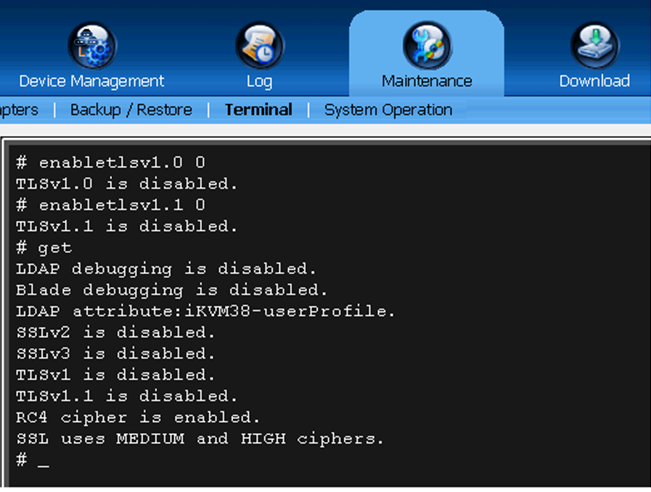
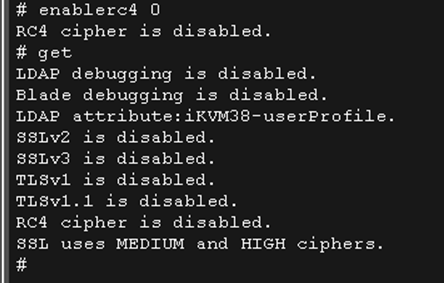
3. Each command should provide an output confirming if it is successfully carried out. Issuing the 'get' command shows which ciphers are used by the KVM along with the other statuses.
Here is the description of the commands used:
Environment: KVM Switches
Cause: Weak ciphers in KVM switches.
Resolution:
1. Log in to the KVM's web management console and go to Maintenance->Terminal.
2. On the terminal window, issue the following commands to disable the weak ciphers:
enabletlsv1.0 0
enabletlsv1.1 0
enablerc4 0
setsslcipher 2
3. Each command should provide an output confirming if it is successfully carried out. Issuing the 'get' command shows which ciphers are used by the KVM along with the other statuses.
Here is the description of the commands used:
- enabletlsv1.0 0 - Disables TLS 1.0
- enabletlsv1.1 0 - Disables TLS 1.1
- enablerc4 0 - Disables RC4
- setsslcipher 2 - Disables DES, 3DES, and sets the cipher strength.
פורסם עבור: שניידר אלקטריק ישראל
Discontinued
Discontinued
Discontinued
Discontinued
Discontinued
Discontinued