


How to perform a soft reset on an EGX100 or EGX300
Issue
A user would like to reboot an EGX100/EGX300 without removing control power or writing to registers on the gateway.
Product Line
EGX300
EGX100
Environment
Device Soft Reset
Cause
The EGX can be rebooted using the reset button on the front of the device.
Resolution
1) On the EGX front panel, continuously hold reset button more than 10sec.
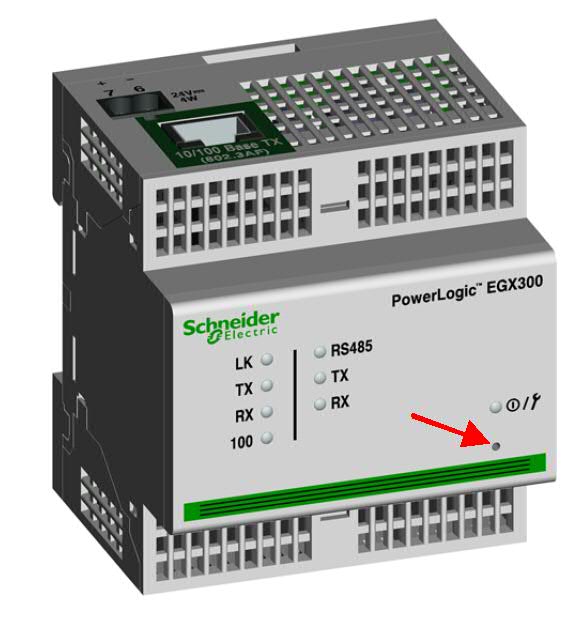
2) All of the LEDs on the EGX will flash off and then on again.
3) Once the EGX is booted back up it will have experienced a simulated power cycle. No data or device configuration will be lost.
A user would like to reboot an EGX100/EGX300 without removing control power or writing to registers on the gateway.
Product Line
EGX300
EGX100
Environment
Device Soft Reset
Cause
The EGX can be rebooted using the reset button on the front of the device.
Resolution
1) On the EGX front panel, continuously hold reset button more than 10sec.
2) All of the LEDs on the EGX will flash off and then on again.
3) Once the EGX is booted back up it will have experienced a simulated power cycle. No data or device configuration will be lost.
Released for: Schneider Electric Thailand
