


How can we help you today?
How convert a 984 HSBY application to Unity
Issue
How convert a 984 HSBY application to Unity
Product Line
Unity
Environment
Windows 10
Resolution
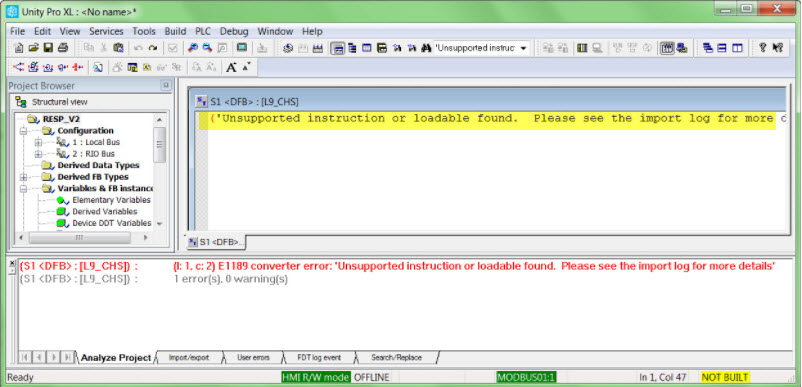
This error is expected because the application contains a CHS loadable function block.
How convert a 984 HSBY application to Unity
Product Line
Unity
Environment
Windows 10
Resolution
- Open the ProWORX 32 application.
- Select the appropriate settings in the 'L984 Options' window.
- Click on OK
- The application imported without any errors. Attempts to rebuild the application will fail with two errors:
This error is expected because the application contains a CHS loadable function block.
The reason for the error is because Unity is not able to delete the CHS loadable block. The CHS block is not needed in a Unity
Hot Standby application. The Hot Standby function is managed from Hot Standby window in the PLC configuration.
To resolve the issue:
- Double click on the error message (This will open the DFB)
- Delete the structured text in the DFB block.
- Rebuild the application.
- Save the changes.
Released for: Schneider Electric Thailand
Explore more
Range:

Explore more
Range:
Need help?
Product Selector
Quickly and easily find the right products and accessories for your applications.
Get a Quote
Start your sales inquiry online and an expert will connect with you.
Where to buy?
Easily find the nearest Schneider Electric distributor in your location.
Help Center
Find support resources for all your needs, in one place.