


How to create a remote session on the HMIBSC via the Putty tool ?
Question
How to create a remote session on the HMIBSC via the Putty tool ?
Description
1- Install the Putty tool on your PC
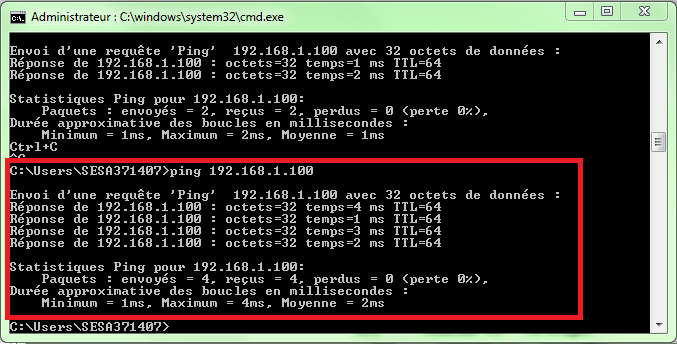
2- Check the connectivity with the HMIBSC target with the ping tool
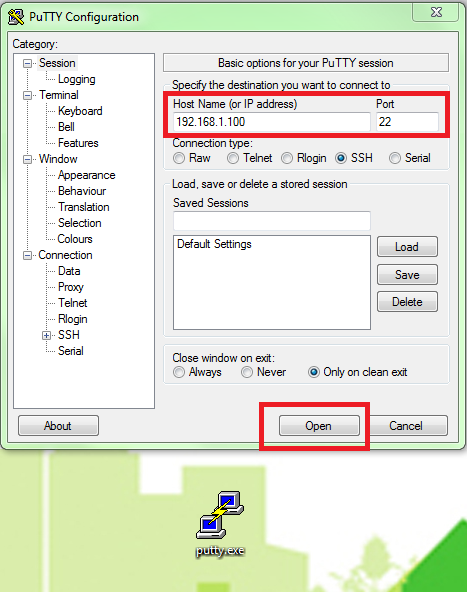
3- Configure and open the session with putty
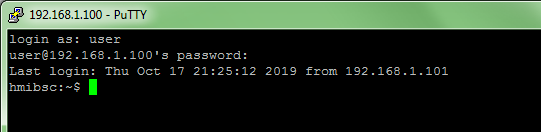
4- You can’t connect directly with the root account for security reasons.
You need to use a user account before ($ prefix).
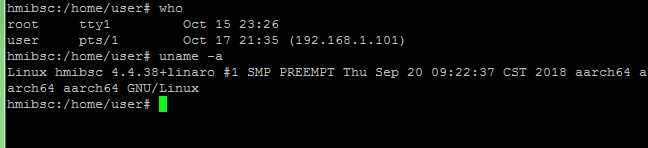
5- Now, it’s possible to login with the root account or to have the admin rights (# prefix)

6- You are connected on the HMIBSC
Keywords
HMIBSC, Magelis IIOT Box, Linux, SSH, remote session, Putty
Case author:
Lilian Cabos
Product Familly
Magelis IIOT Box
How to create a remote session on the HMIBSC via the Putty tool ?
Description
1- Install the Putty tool on your PC
2- Check the connectivity with the HMIBSC target with the ping tool
3- Configure and open the session with putty
4- You can’t connect directly with the root account for security reasons.
You need to use a user account before ($ prefix).
5- Now, it’s possible to login with the root account or to have the admin rights (# prefix)
6- You are connected on the HMIBSC
Keywords
HMIBSC, Magelis IIOT Box, Linux, SSH, remote session, Putty
Case author:
Lilian Cabos
Product Familly
Magelis IIOT Box
Released for: Schneider Electric Thailand
