


What is the RS232 communication pinout for the Micom Relays?
Title
RS232 pinouts for communication with Micom Relays using a computer
Issue
Various USB to RS232 cables are available in the market and the pinouts help pick the right one for good communication
Product Line
Micom Relays
Environment
RS232 front port communications
Cause
Cable with crossover communication pins result in unsuccessful communication
Resolution
The relay is a Data Communication Equipment (DCE) device. Hence the pin connections of the relay's 9-pin front port are as follows:
None of the other pins are connected in the relay.
PC's are normally Data Terminal Equipment (DTE) devices which have a serial port connection as below:
For successful data communication, the Tx pin on the relay must be connected to the Rx pin on the PC, and the Rx pin on the relay must be connected to the Tx pin on the PC.
Therefore, providing that the PC is a DTE, a "straight through" serial connector is required i.e one that connects pin 2 to pin 2, pin 3 to pin 3 and pin 5 to pin 5 as shown below
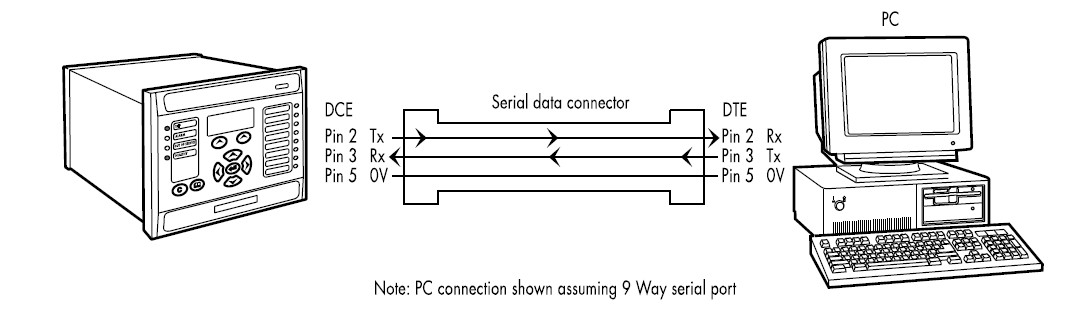
Note: A common cause of difficulty with serial data communication is connecting Tx to Tx and Rx to Rx. This could happen if a 'cross-over' serial connector is used, i.e. one that connects pin2 to pin3, and pin 3 to pin 2, or if the PC has the same pin configuration as the relay.
RS232 pinouts for communication with Micom Relays using a computer
Issue
Various USB to RS232 cables are available in the market and the pinouts help pick the right one for good communication
Product Line
Micom Relays
Environment
RS232 front port communications
Cause
Cable with crossover communication pins result in unsuccessful communication
Resolution
The relay is a Data Communication Equipment (DCE) device. Hence the pin connections of the relay's 9-pin front port are as follows:
Pin no.2 Tx Receive Data
Pin no.3 Rx Transmit Data
Pin no.5 0V Zero volts Common
Pin no.3 Rx Transmit Data
Pin no.5 0V Zero volts Common
None of the other pins are connected in the relay.
PC's are normally Data Terminal Equipment (DTE) devices which have a serial port connection as below:
Pin no.2 Rx Receive Data
Pin no.3 Tx Transmit Data
Pin no.5 0V Zero volts Common
Pin no.3 Tx Transmit Data
Pin no.5 0V Zero volts Common
For successful data communication, the Tx pin on the relay must be connected to the Rx pin on the PC, and the Rx pin on the relay must be connected to the Tx pin on the PC.
Therefore, providing that the PC is a DTE, a "straight through" serial connector is required i.e one that connects pin 2 to pin 2, pin 3 to pin 3 and pin 5 to pin 5 as shown below
Note: A common cause of difficulty with serial data communication is connecting Tx to Tx and Rx to Rx. This could happen if a 'cross-over' serial connector is used, i.e. one that connects pin2 to pin3, and pin 3 to pin 2, or if the PC has the same pin configuration as the relay.
Yayımlanma amacı: Schneider Electric Turkey

Yardıma mı ihtiyacınız var?
Ürün seçici
Uygulamalarınız için doğru ürünleri ve aksesuarları hızlı ve kolay bir şekilde bulun.
Teklif Alın
Satışla ilgili sorularınızı çevrimiçi olarak başlatın, bir uzman sizinle bağlantı kuracaktır.
Satış noktaları
Konumunuza en yakın Schneider Electric distribütörünü kolayca bulun.
Yardım Merkezi
Tüm ihtiyaçlarınız için destek kaynaklarını tek bir yerde bulun.