


How to sync the HMISTU655/855 to a PLC TOD (Time of Day) clock?
Goals and Symptoms
This resolution is to sync the Magelis time of day clock to a PLC clock. You will need to read the clock and put each value into a separate address/tag. How this will work is that on startup, the Magelis will try to communicate to the PLC to set the HMI clock using two scripts (sys.setTime and sys.setDate).
Causes and Fixes
HMISTU655/855 sync to a PLC TOD
This resolution is to sync the Magelis time of day clock to a PLC clock. You will need to read the clock and put each value into a separate address/tag.
How this will work is that on startup, the Magelis will try to communicate to the PLC to set the HMI clock using two scripts (sys.setTime and sys.setDate).
Enable Time Management for Manual configuration and also enable Auto start. The time to auto start is up to you. You want to optimize the time so that
your PLC is up before Magelis starts communicating. 20 seconds is just a starting reference and it could be more or less depending on the PLC boot time.

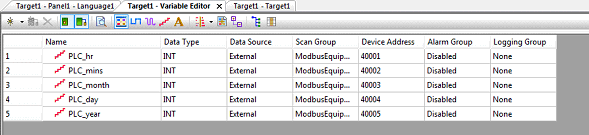
Create 5 external variables for the hours, minutes, month, day, and year to read the data from the PLC.
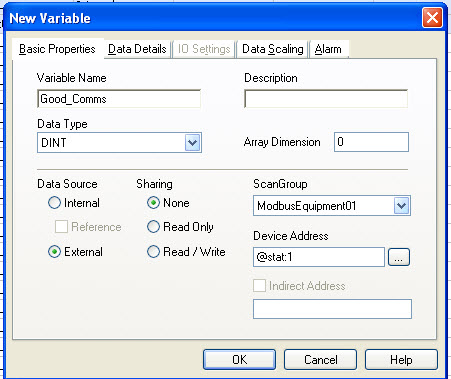
Create an external communications statistics variable to monitor the communication for that scangroup.
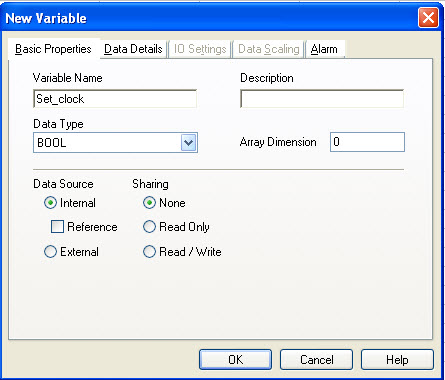
Last but not least, create an internal boolean variable with a initial value of 1. The initial value is under the Data Details Tab.
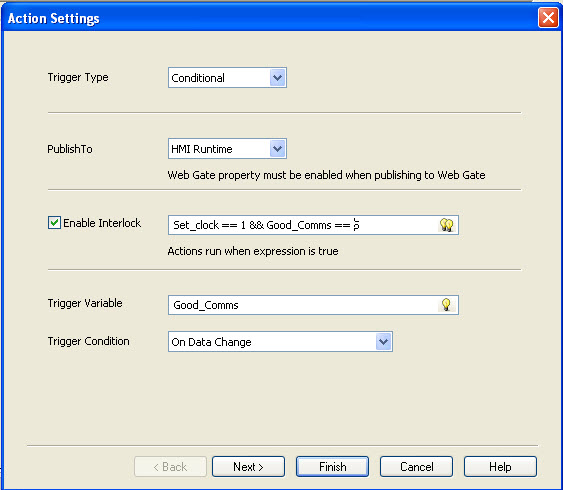
Under Actions, create an action with a trigger type of Conditional. Trigger Variable is the Communications statistics variable, Good_Comms, and Trigger Condition as On Data Change.
Also check the box for Enable Interlock with the following syntax: "Set_clock == 1 && Good_Comms == 5", then click Next.
Select Script as an operation and click New Script.
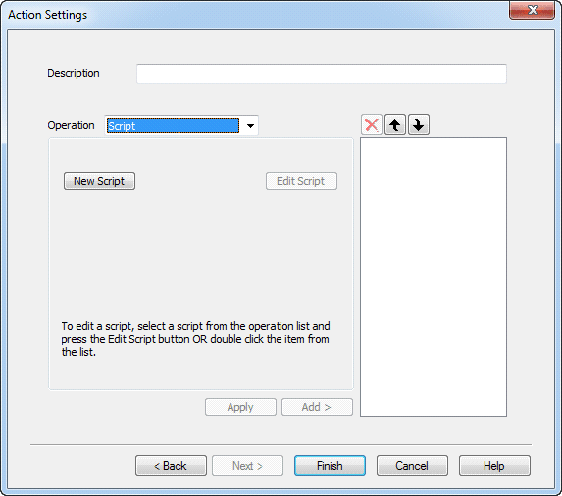
Type the following script into the field. Your variables that are reading the TOD maybe different then the ones in this resolution. Keep in mind that the PLC_year variable needs to be a 4 digit value.
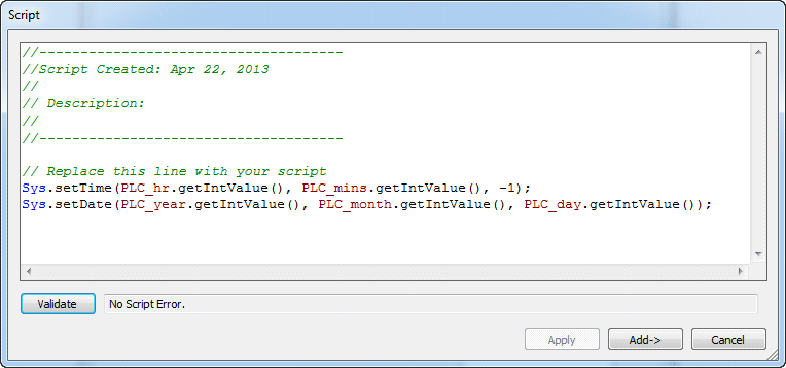
Click Add and then add another operation called Bit with the Reset operation on the Set_clock boolean tag. Click Add and Finish.
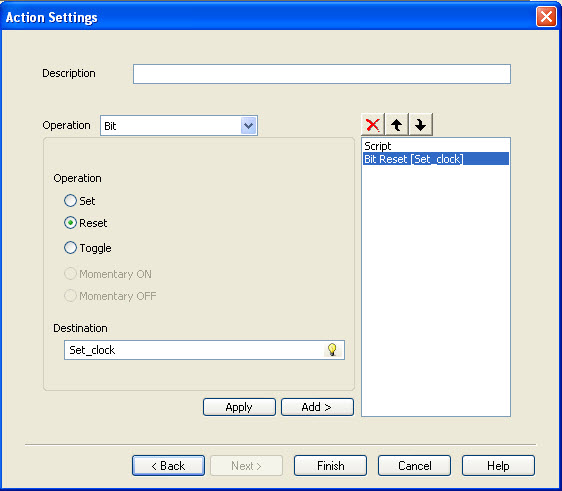
This Action will run on the HMI when the Good_Comms counter has reached a value of 5 and the Set_clock is TRUE to set the TOD clock. Once the clock is set, Set_clock is set to FALSE
and the script will no longer execute until a power cycle of the HMI.
This resolution is to sync the Magelis time of day clock to a PLC clock. You will need to read the clock and put each value into a separate address/tag.
How this will work is that on startup, the Magelis will try to communicate to the PLC to set the HMI clock using two scripts (sys.setTime and sys.setDate).
Enable Time Management for Manual configuration and also enable Auto start. The time to auto start is up to you. You want to optimize the time so that
your PLC is up before Magelis starts communicating. 20 seconds is just a starting reference and it could be more or less depending on the PLC boot time.
Create 5 external variables for the hours, minutes, month, day, and year to read the data from the PLC.
Create an external communications statistics variable to monitor the communication for that scangroup.
Last but not least, create an internal boolean variable with a initial value of 1. The initial value is under the Data Details Tab.
Under Actions, create an action with a trigger type of Conditional. Trigger Variable is the Communications statistics variable, Good_Comms, and Trigger Condition as On Data Change.
Also check the box for Enable Interlock with the following syntax: "Set_clock == 1 && Good_Comms == 5", then click Next.
Select Script as an operation and click New Script.
Type the following script into the field. Your variables that are reading the TOD maybe different then the ones in this resolution. Keep in mind that the PLC_year variable needs to be a 4 digit value.
Click Add and then add another operation called Bit with the Reset operation on the Set_clock boolean tag. Click Add and Finish.
This Action will run on the HMI when the Good_Comms counter has reached a value of 5 and the Set_clock is TRUE to set the TOD clock. Once the clock is set, Set_clock is set to FALSE
and the script will no longer execute until a power cycle of the HMI.