


我们今天能为您提供什么帮助?
How to restore a database using TSQL commands
Issue
For use when a database needs to be restored via TSQL instead of via the graphical interface in SQL Server Management Studio.
Produce Line
Microsoft SQL Server
Environment
Microsoft SQL Server 2005
Microsoft SQL Server 2008
Microsoft SQL Server 2008 R2
Microsoft SQL Server 2012
Microsoft SQL Server 2012 R2
Cause
A database needs to be restored using the SQL Server Management Studio, but standard restore option is not functioning.
Resolution
*Warning: Irreparable database damage can occur. This procedure should only be performed by
users familiar with SQL Server Management Studio. Databases should be backed up prior to
performing this procedure.*
The following query can be used to restore a database.
---------------------------------
Use Master
Go
RESTORE DATABASE YourDB
FROM DISK = 'C:\YourBackUpFile.bak'
WITH MOVE 'YourMDFLogicalName' TO 'D:\Data\YourMDFFile.mdf',
MOVE 'YourLDFLogicalName' TO 'D:\Data\YourLDFFile.ldf'
---------------------------------
YourDB -> The name of the database inside SQL Server. Examples are "ION_Data" or "SMS_System".
YourBackUpFile -> This will be the full path of the BAK file you are looking to restore.
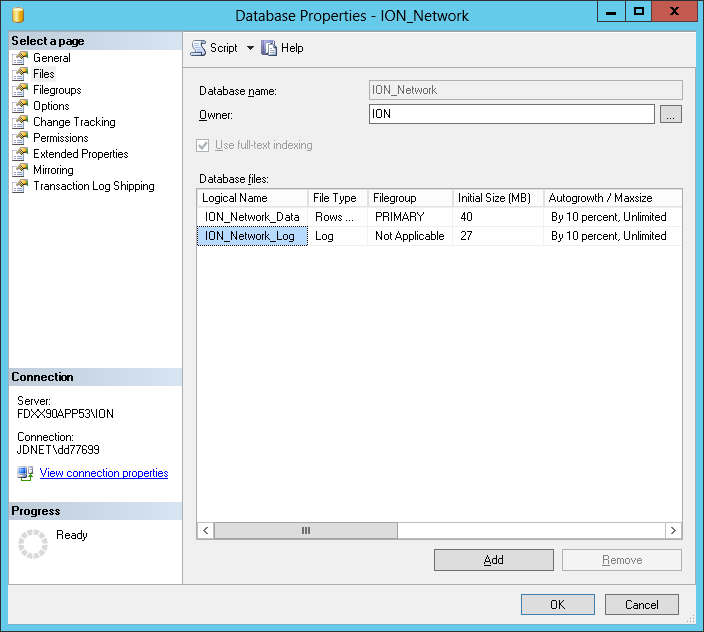
YourMDFLogicalName -> The logical name of the database container (MDF file) must be known. To determine this information, open SQL Server Management Studio and connect to the instance the original database is attached to (this will be the database that was backed up to create the BAK file). Right-click on the database and select Properties>Files. There is a column named "Logical Name" that will provide the logical name of the database container. (See graphic below.)
YourMDFFile -> This is the path and file name of where you would like the MDF file to be located.
YourLDFLogicalName -> The logical name of the database transaction log (LDF file) must be known. To determine this information, open SQL Server Management Studio and connect to the instance the original database is attached to (this will be the database that was backed up to create the BAK file). Right-click on the database and select Properties>Files. There is a column named "Logical Name" that will provide the logical name of the database transaction log. (See graphic below.)
YourLDFFile -> This is the path and file name of where you would like the LDF file to be located.
For use when a database needs to be restored via TSQL instead of via the graphical interface in SQL Server Management Studio.
Produce Line
Microsoft SQL Server
Environment
Microsoft SQL Server 2005
Microsoft SQL Server 2008
Microsoft SQL Server 2008 R2
Microsoft SQL Server 2012
Microsoft SQL Server 2012 R2
Cause
A database needs to be restored using the SQL Server Management Studio, but standard restore option is not functioning.
Resolution
*Warning: Irreparable database damage can occur. This procedure should only be performed by
users familiar with SQL Server Management Studio. Databases should be backed up prior to
performing this procedure.*
The following query can be used to restore a database.
---------------------------------
Use Master
Go
RESTORE DATABASE YourDB
FROM DISK = 'C:\YourBackUpFile.bak'
WITH MOVE 'YourMDFLogicalName' TO 'D:\Data\YourMDFFile.mdf',
MOVE 'YourLDFLogicalName' TO 'D:\Data\YourLDFFile.ldf'
---------------------------------
YourDB -> The name of the database inside SQL Server. Examples are "ION_Data" or "SMS_System".
YourBackUpFile -> This will be the full path of the BAK file you are looking to restore.
YourMDFLogicalName -> The logical name of the database container (MDF file) must be known. To determine this information, open SQL Server Management Studio and connect to the instance the original database is attached to (this will be the database that was backed up to create the BAK file). Right-click on the database and select Properties>Files. There is a column named "Logical Name" that will provide the logical name of the database container. (See graphic below.)
YourMDFFile -> This is the path and file name of where you would like the MDF file to be located.
YourLDFLogicalName -> The logical name of the database transaction log (LDF file) must be known. To determine this information, open SQL Server Management Studio and connect to the instance the original database is attached to (this will be the database that was backed up to create the BAK file). Right-click on the database and select Properties>Files. There is a column named "Logical Name" that will provide the logical name of the database transaction log. (See graphic below.)
YourLDFFile -> This is the path and file name of where you would like the LDF file to be located.
發佈於: 施耐德電機Taiwan