


我们今天能为您提供什么帮助?
Power Monitoring Expert Client application screen tearing (Menu bar) when using higher display resolutions
Issue
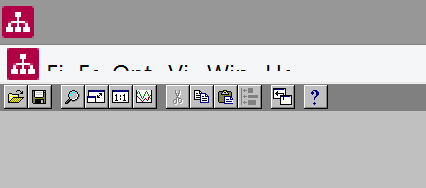
When using higher resolutions (3840x2160) with Power Monitoring Expert, it has been seen where the Menu Bar for the PME client applications (Vista/Designer) will get cut off or result in screen tearing.
Product Line
Power Monitoring Expert v7.x
Power Monitoring Expert v8.x
Power Monitoring Expert v9.x
Power Monitoring Expert 2020
Power Monitoring Expert 2021
Power Monitoring Expert 2022
Power Monitoring Expert 2023
Environment
Management Console
Vista
Designer
Cause
For applications that do not scale correctly for use on high-DPI displays, Windows enables a feature that is known as DPI Virtualization. This enables the application to run as if it were on a lower-DPI display. Windows will then scale up the application's graphical display appropriately so that it is shown at the appropriate visual size for the high-DPI display. However, this has the side effect that the application's text and graphics will not be as crisp and clear as an application that is natively rendering its output for use on a high-DPI display.
Resolution
Disable DPI Virtualization for the application. This causes the text in the application to appear clearer. However, if the application does not correctly handle high DPI settings, this procedure may have adverse side effects such as truncated text and incorrectly sized graphical elements.
For Windows 10: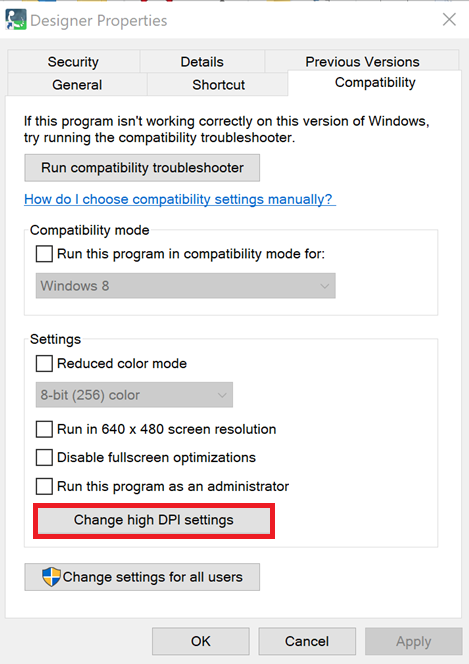
When using higher resolutions (3840x2160) with Power Monitoring Expert, it has been seen where the Menu Bar for the PME client applications (Vista/Designer) will get cut off or result in screen tearing.
Product Line
Power Monitoring Expert v7.x
Power Monitoring Expert v8.x
Power Monitoring Expert v9.x
Power Monitoring Expert 2020
Power Monitoring Expert 2021
Power Monitoring Expert 2022
Power Monitoring Expert 2023
Environment
Management Console
Vista
Designer
Cause
For applications that do not scale correctly for use on high-DPI displays, Windows enables a feature that is known as DPI Virtualization. This enables the application to run as if it were on a lower-DPI display. Windows will then scale up the application's graphical display appropriately so that it is shown at the appropriate visual size for the high-DPI display. However, this has the side effect that the application's text and graphics will not be as crisp and clear as an application that is natively rendering its output for use on a high-DPI display.
Resolution
Disable DPI Virtualization for the application. This causes the text in the application to appear clearer. However, if the application does not correctly handle high DPI settings, this procedure may have adverse side effects such as truncated text and incorrectly sized graphical elements.
For Windows 10:
- Right-click the application's shortcut
- Select Properties.
- Open the Compatibility tab
- Click Change high DPI settings
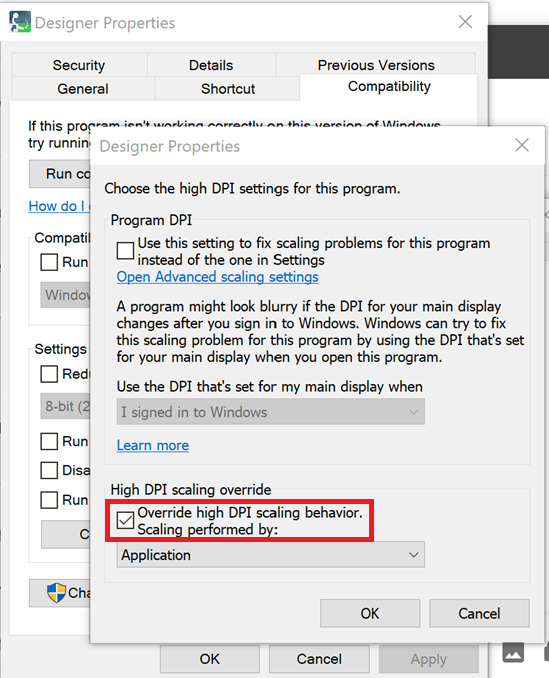
- Check Override high DPI scaling behavior.
- Click OK.
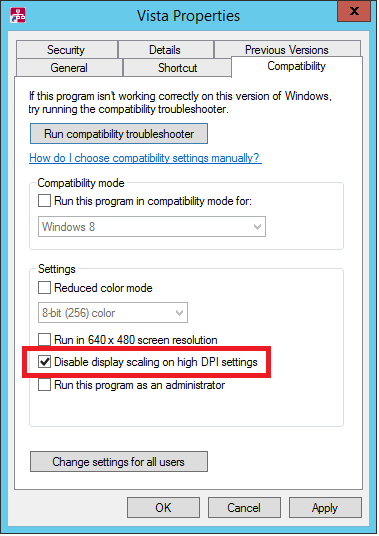
- Right-click the application's shortcut
- Select Properties.
- Open the Compatibility tab
- Select Disable Display Scaling On High DPI Settings
- Click OK.
"Some desktop applications may appear blurred on high-DPI displays." Microsoft Support, 14 Aug. 2015, support.microsoft.com/en-us/help/2900023/some-desktop-applications-may-appear-blurred-on-high-dpi-displays.
發佈於: 施耐德電機Taiwan