.svg)
Issue
Power Factor is not meeting its target but its not using all the capacitors.
Product Line
VarPlus Logic VL6
VarPlus Logic VL12
Cause
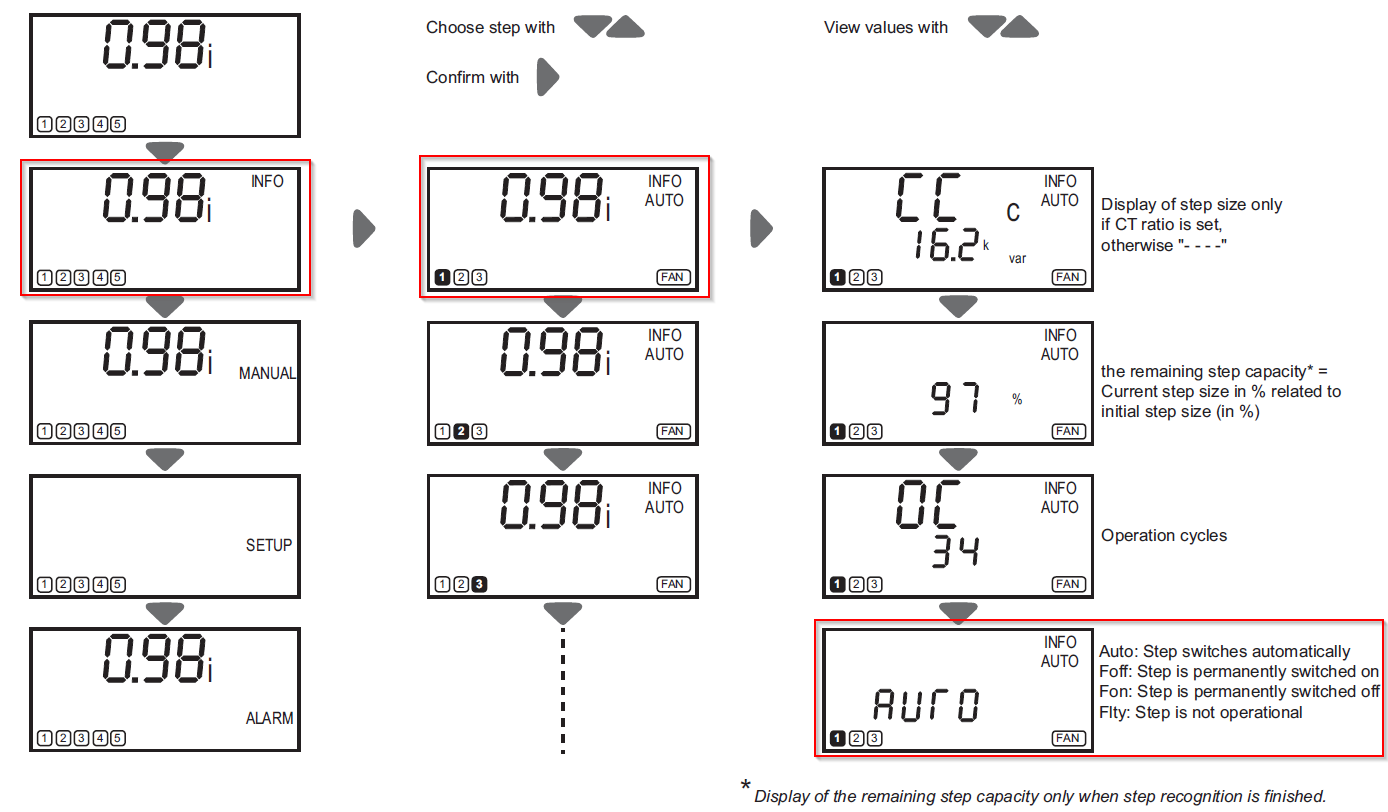
The capacitor is set to Foff or Flty. This will cause the capacitor never to turn on. To view the status of the capacitor from the display:
1. Arrow left until main screen.
2. Arrow up or down to setup
3. Arrow right to select setup
4. Arrow down to the capacitor in question
5. Arrow right to select that capacitor
6. Arrow down multiple time to output to view the status. It could be Fon, Foff, Flty, or Auto.
Please see picture below to help.
Resolution
If the output under info is set to anything other then AUTO or Fon then the following steps is how to change it.
1. Arrow to the left until the main screen.
2. Arrow up or down to setup
3. Arrow to the right twice
4. Arrow down to OUT
5. Arrow to the right
6. Now arrow down to the capacitor that needs to be changed
7. Once the correct one is selected arrow to the right
8. Arrow up or down to select Fon (Fix on which means always on) or AUTO ( only on when needed)
9. Arrow to the left until back to main screen
Please see picture below to help

Power Factor is not meeting its target but its not using all the capacitors.
Product Line
VarPlus Logic VL6
VarPlus Logic VL12
Cause
The capacitor is set to Foff or Flty. This will cause the capacitor never to turn on. To view the status of the capacitor from the display:
1. Arrow left until main screen.
2. Arrow up or down to setup
3. Arrow right to select setup
4. Arrow down to the capacitor in question
5. Arrow right to select that capacitor
6. Arrow down multiple time to output to view the status. It could be Fon, Foff, Flty, or Auto.
Please see picture below to help.
Resolution
If the output under info is set to anything other then AUTO or Fon then the following steps is how to change it.
1. Arrow to the left until the main screen.
2. Arrow up or down to setup
3. Arrow to the right twice
4. Arrow down to OUT
5. Arrow to the right
6. Now arrow down to the capacitor that needs to be changed
7. Once the correct one is selected arrow to the right
8. Arrow up or down to select Fon (Fix on which means always on) or AUTO ( only on when needed)
9. Arrow to the left until back to main screen
Please see picture below to help
