


我们今天能为您提供什么帮助?
How to manage the import/export of the Symbol list in EcoStruxure Machine Expert - Basic?
Depending on Microsoft Excel and Windows settings, the .csv file created when exporting the Symbol list from ESME-Basic* could not be displayed as expected in MS Excel.
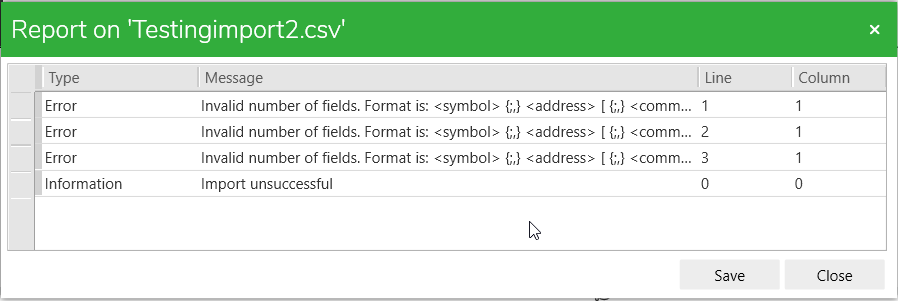
Likewise, we could get some errors when importing the Symbol list in ESME-Basic.
Example of error during the import:
Hereafter, a summary of the different combinations:
1) List Separator in Windows settings => Comma: “,”
Export options in ESME-Basic:
• Unicode + Semicolon => need to adapt in Excel by selecting semicolon as delimiter => save as .csv-utf8 file => import in ESME-Basic by selecting semicolon => Error
• Unicode + Comma => need to adapt in Excel by selecting comma as delimiter => save as .csv-utf8 file => import in ESME-Basic by selecting comma => OK
• ANSI + Semicolon => need to adapt in Excel by selecting semicolon as delimiter=> save as .csv file => import in ESME-Basic by selecting semicolon => Error
• ANSI + Comma => correctly displayed in Excel without doing any adaptation => save as .csv file => import in ESME-Basic by selecting comma => OK
2) List Separator in Windows settings => Semicolon: “;”
Export options in ESME-Basic:
• Unicode + Semicolon => need to adapt in Excel by selecting semicolon as delimiter=> save as .csv-utf8 file => import in ESME-Basic by selecting semicolon => OK
• Unicode + Comma => need to adapt in Excel by selecting comma as delimiter => save as .csv-utf8 file => import in ESME-Basic by selecting comma => Error
• ANSI + Semicolon => correctly displayed in Excel without doing any adaptation => save as .csv file => import in ESME-Basic by selecting semicolon => OK
• ANSI + Comma => need to adapt in Excel by selecting comma as delimiter=> save as .csv file => import in ESME-Basic by selecting comma => Error
Through these different tests, we can see the error appears when the list separator of Windows is different from the separator selected in ESME-Basic.
When handling Unicode file, take care to select csv-utf8 format when saving as the .csv file in MS Excel.
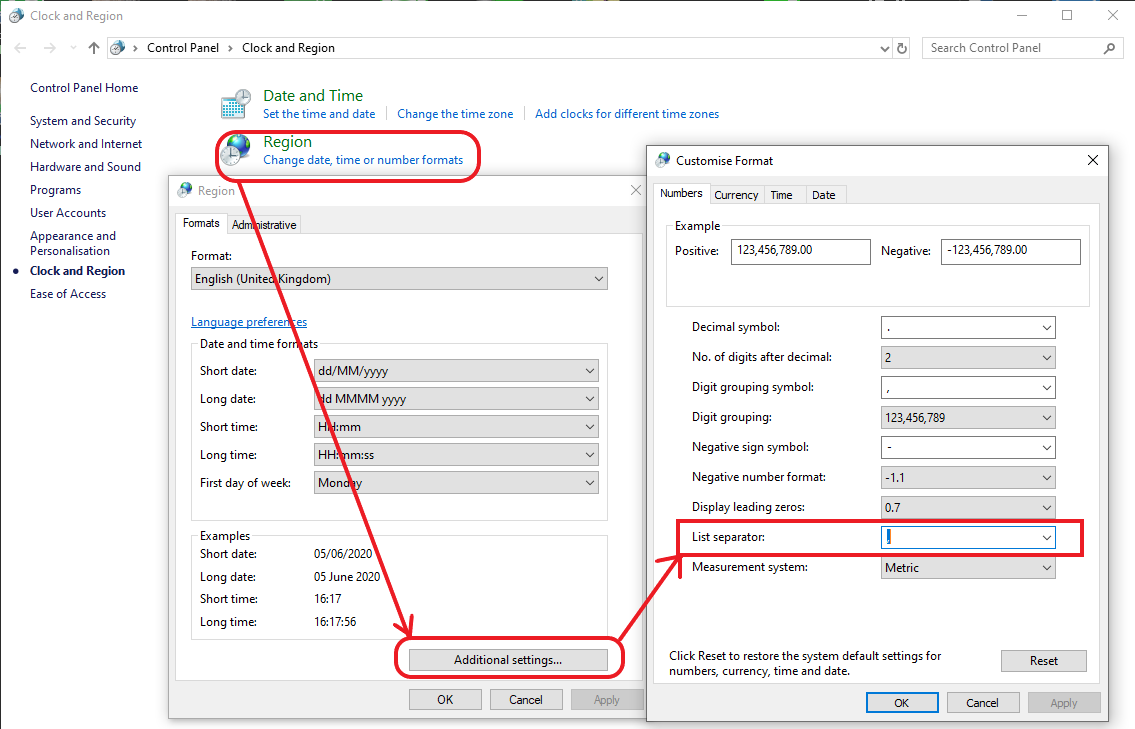
Note 1: How to change the List separator in Windows?
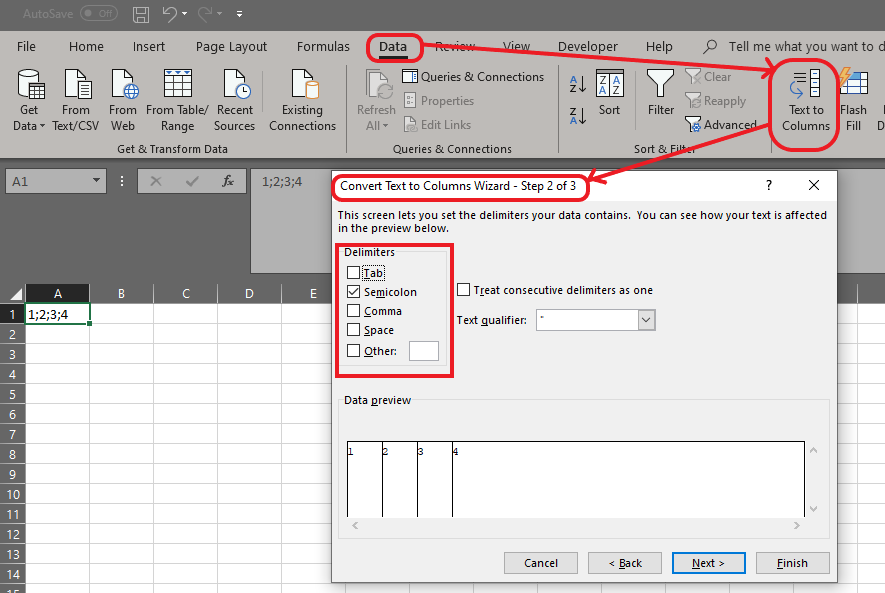
Note 2: How to change the Delimiter in MS Excel?
*ESME-Basic: EcoStruxure Machine Expert - Basic
Likewise, we could get some errors when importing the Symbol list in ESME-Basic.
Example of error during the import:
Hereafter, a summary of the different combinations:
1) List Separator in Windows settings => Comma: “,”
Export options in ESME-Basic:
• Unicode + Semicolon => need to adapt in Excel by selecting semicolon as delimiter => save as .csv-utf8 file => import in ESME-Basic by selecting semicolon => Error
• Unicode + Comma => need to adapt in Excel by selecting comma as delimiter => save as .csv-utf8 file => import in ESME-Basic by selecting comma => OK
• ANSI + Semicolon => need to adapt in Excel by selecting semicolon as delimiter=> save as .csv file => import in ESME-Basic by selecting semicolon => Error
• ANSI + Comma => correctly displayed in Excel without doing any adaptation => save as .csv file => import in ESME-Basic by selecting comma => OK
2) List Separator in Windows settings => Semicolon: “;”
Export options in ESME-Basic:
• Unicode + Semicolon => need to adapt in Excel by selecting semicolon as delimiter=> save as .csv-utf8 file => import in ESME-Basic by selecting semicolon => OK
• Unicode + Comma => need to adapt in Excel by selecting comma as delimiter => save as .csv-utf8 file => import in ESME-Basic by selecting comma => Error
• ANSI + Semicolon => correctly displayed in Excel without doing any adaptation => save as .csv file => import in ESME-Basic by selecting semicolon => OK
• ANSI + Comma => need to adapt in Excel by selecting comma as delimiter=> save as .csv file => import in ESME-Basic by selecting comma => Error
Through these different tests, we can see the error appears when the list separator of Windows is different from the separator selected in ESME-Basic.
When handling Unicode file, take care to select csv-utf8 format when saving as the .csv file in MS Excel.
Note 1: How to change the List separator in Windows?
Note 2: How to change the Delimiter in MS Excel?
*ESME-Basic: EcoStruxure Machine Expert - Basic
發佈於: 施耐德電機Taiwan