.svg)
This document explains User, how to disable security (Login credentials) for Simulation Runtimes of HMI in Ecostruxure Automation Expert 21.1.
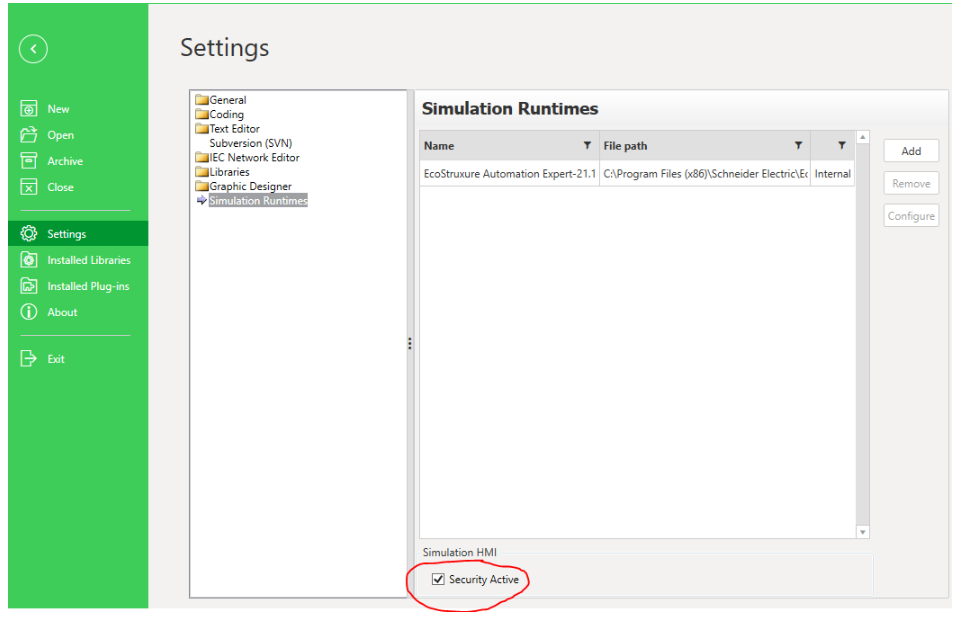
While developing application, user needs to perform simulation of HMI frequently and every time User needs to given login credentials which can be pain point. So in order to allow user to run the HMI runtimes without security (Login credentials), there is an option provided in the Settings of Simulation Runtimes, which is "Security Active". By default this setting will be in Active and to disable it User has to uncheck the selection.
Note: This setting is for disabling security on Simulation Runtimes only. There is no option to disable security for real HMI runtimes. If this "security Active" is unchecked and User tried to deploy to real HMI devices, then there will connection authentication errors between HMI and Controller. The errors are shown in below screenshot.

In order to resolve these errors, User has to enable the "security Active" setting for proper authentication between Controller & HMI devices.
This document is applicable from Ecostruxure Automation Expert 21.1 onwards.
While developing application, user needs to perform simulation of HMI frequently and every time User needs to given login credentials which can be pain point. So in order to allow user to run the HMI runtimes without security (Login credentials), there is an option provided in the Settings of Simulation Runtimes, which is "Security Active". By default this setting will be in Active and to disable it User has to uncheck the selection.
Note: This setting is for disabling security on Simulation Runtimes only. There is no option to disable security for real HMI runtimes. If this "security Active" is unchecked and User tried to deploy to real HMI devices, then there will connection authentication errors between HMI and Controller. The errors are shown in below screenshot.
In order to resolve these errors, User has to enable the "security Active" setting for proper authentication between Controller & HMI devices.
This document is applicable from Ecostruxure Automation Expert 21.1 onwards.
發佈於: 施耐德電機Taiwan

