


How can we help you today?
You are currently viewing the content available in Vietnam. If you are looking for information for another region, please select the correct country from the top-left dropdown in the page and 'Navigate to Browse FAQs' in the Support menu.
How to modify the external project path for Vijeo Designer ?
The goal of this article is to explain how to modify the external project path for Vijeo Designer if it had been modified or is incorrect.
The article is applicable for Vijeo Designer v6.2 or more.
For example, it's possible to install Vijeo Designer software on a system disk (as C:\ ) and store the project on another disk (as D:\ )
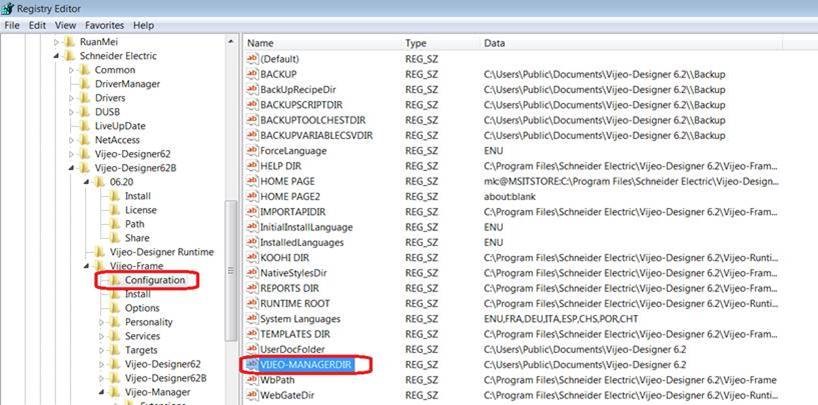
To modify paths, please use the regedit tool and modify 2 registry keys in the registry base :
The article is applicable for Vijeo Designer v6.2 or more.
For example, it's possible to install Vijeo Designer software on a system disk (as C:\ ) and store the project on another disk (as D:\ )
To modify paths, please use the regedit tool and modify 2 registry keys in the registry base :
- " Vijeo-frame -> Vijeo-Manager -> ROOTDIR "
- " Vijeo-frame -> Configuration -> VijeoManagerDir "
Released for: Schneider Electric Vietnam
Explore more
Product:

Explore more
Product:
Need help?
Product Selector
Quickly and easily find the right products and accessories for your applications.
Get a Quote
Start your sales enquiry online and an expert will connect with you.
Where to buy?
Easily find the nearest Schneider Electric distributor in your location.
Help Centre
Find support resources for all your needs, in one place.