


What is the recommended serial port configuration when connecting a Powerlink G3 Controller to an EGX150 (Link150)?
Issue
During installation, the EGX150 may need to be configured to communicate with the Powerlink controller.
Product Line
EGX150 (Link 150)
Powerlink G3 controller (NF1000, NF3000)
Environment
Installation and setup
Resolution
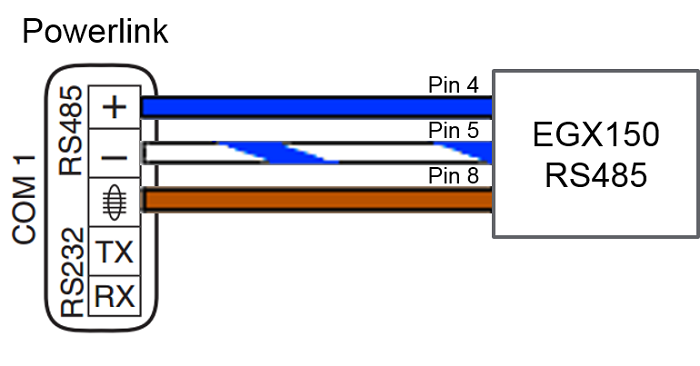
Configuring to communicate via RS-485
Wire RS-485 connection as follows:
Powerlink Serial Settings
Address: <unique identifier>
Baud Rate: <consistant with EGX150 device>
Parity: Even
Mode: 7-bit ASCII
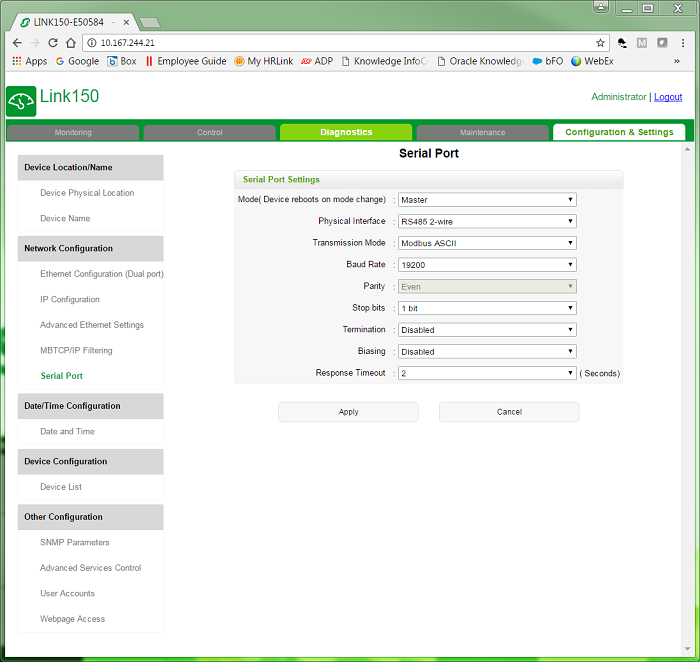
EGX150 Serial Port Settings
Mode: Master
Physical Interface: RS485 2-wire
Transmission Mode: Modbus ASCII
Baud Rate: <consistant with Powerlink device>
Stop bits: 1 bit
Response Timeout: 2 seconds
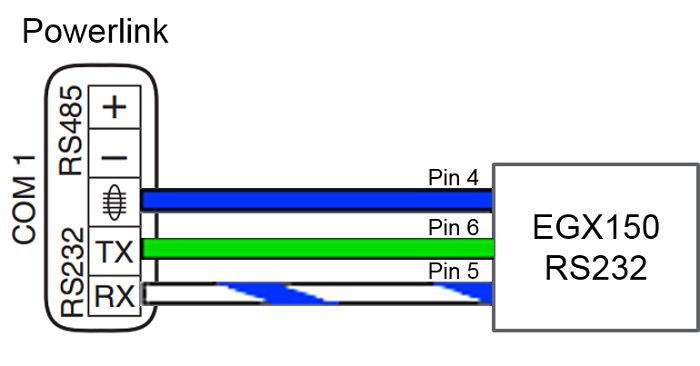
Configuring to communicate via RS-232
Wire RS-232 connection as follows:
Powerlink Serial Settings
Address: <unique identifier>
Baud Rate: <consistant with EGX150 device>
Parity: Even
Mode: 7-bit ASCII
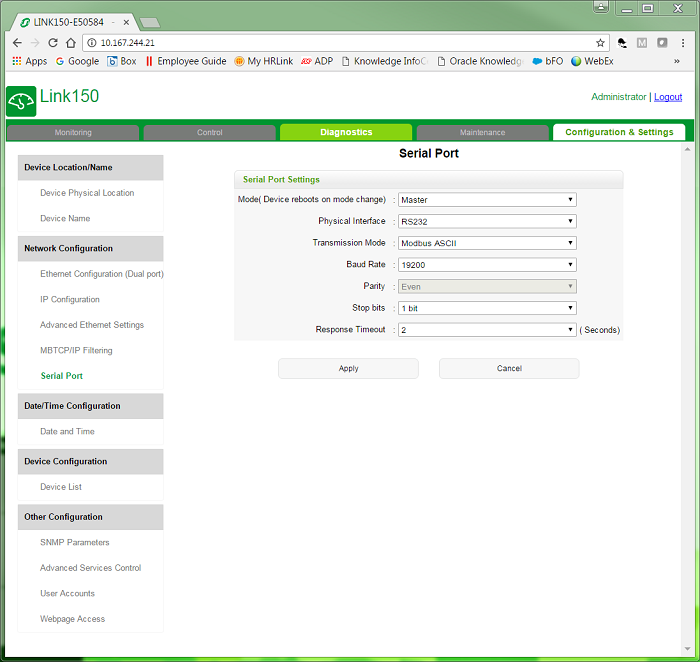
EGX150 Serial Port Settings
Mode: Master
Physical Interface: RS232
Transmission Mode: Modbus ASCII
Baud Rate: <consistant with Powerlink device>
Stop bits: 1 bit
Response Timeout: 2 seconds
Once both of the devices are configured, the Powerlink device needs to be added to the EGX150's device list.
To add the Powerlink device to the EGX150: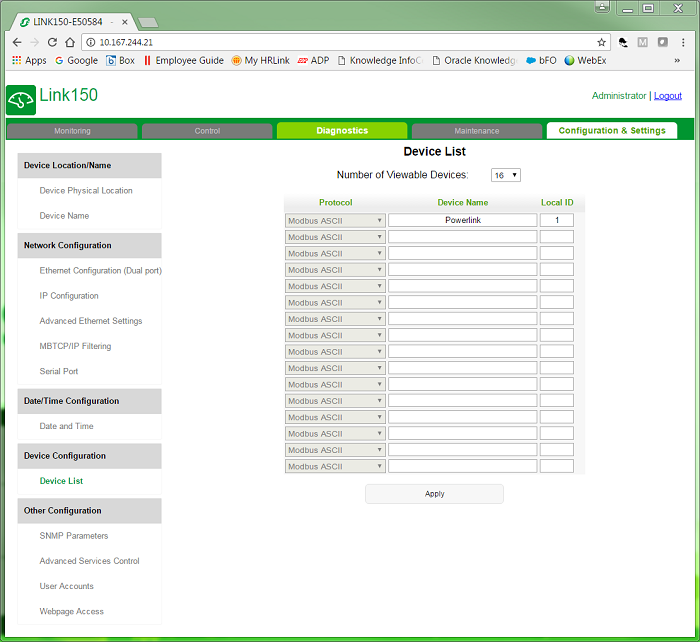
During installation, the EGX150 may need to be configured to communicate with the Powerlink controller.
Product Line
EGX150 (Link 150)
Powerlink G3 controller (NF1000, NF3000)
Environment
Installation and setup
Resolution
Configuring to communicate via RS-485
Wire RS-485 connection as follows:
Powerlink Serial Settings
Address: <unique identifier>
Baud Rate: <consistant with EGX150 device>
Parity: Even
Mode: 7-bit ASCII
EGX150 Serial Port Settings
Mode: Master
Physical Interface: RS485 2-wire
Transmission Mode: Modbus ASCII
Baud Rate: <consistant with Powerlink device>
Stop bits: 1 bit
Response Timeout: 2 seconds
Configuring to communicate via RS-232
Wire RS-232 connection as follows:
Powerlink Serial Settings
Address: <unique identifier>
Baud Rate: <consistant with EGX150 device>
Parity: Even
Mode: 7-bit ASCII
EGX150 Serial Port Settings
Mode: Master
Physical Interface: RS232
Transmission Mode: Modbus ASCII
Baud Rate: <consistant with Powerlink device>
Stop bits: 1 bit
Response Timeout: 2 seconds
Once both of the devices are configured, the Powerlink device needs to be added to the EGX150's device list.
To add the Powerlink device to the EGX150:
- Navigate to the Configuration & Settings tab
- Select Device List on the left-hand side of the screen
- Enter a Device Name and then specify the Local ID to be the Address set in the Powerlink device