


What would cause the PRM module TCSEGPA23F14F in a Quantum setup not to go into Run?
Issue
PRM Module Run/Stop LED is not solid green.
Product Line
Profibus with Quantum - TCSEGPA23F14F
Cause
The PRM module will not go into Run Mode. The following conditions could cause the PRM to not go into Run Mode:
1. When there is no configuration file. DTM is connected.
2. When there is a configuration file, but you don’t start the PRM communication using the DFB, PRM_MGT_Q.
Resolution
In order to check the first condition, you must right click on your PRM Client in Unity and select "Store data to device".
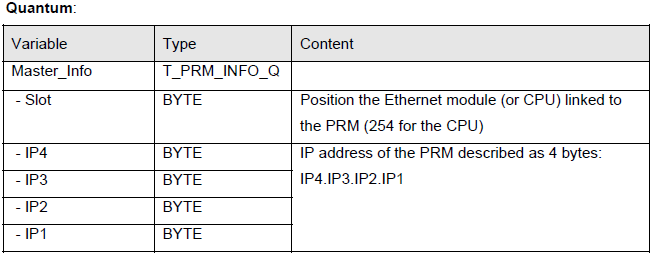
In order to check the second condition you must initialize the input "Client_Info" in the PRM_MGT_Q DFB in the following way:
If this FAQ did not solve your issue, you can chat with us at chat with us or e-mail us at customer.services@se.com to create a case with our Technical Support Team.
If you are not located in North America, please contact your local Customer Care Center for assistance:
Support | Schneider Electric Global (se.com)
PRM Module Run/Stop LED is not solid green.
Product Line
Profibus with Quantum - TCSEGPA23F14F
Cause
The PRM module will not go into Run Mode. The following conditions could cause the PRM to not go into Run Mode:
1. When there is no configuration file. DTM is connected.
2. When there is a configuration file, but you don’t start the PRM communication using the DFB, PRM_MGT_Q.
Resolution
In order to check the first condition, you must right click on your PRM Client in Unity and select "Store data to device".
In order to check the second condition you must initialize the input "Client_Info" in the PRM_MGT_Q DFB in the following way:
If this FAQ did not solve your issue, you can chat with us at chat with us or e-mail us at customer.services@se.com to create a case with our Technical Support Team.
If you are not located in North America, please contact your local Customer Care Center for assistance:
Support | Schneider Electric Global (se.com)