


Sepam 80 - when I upload settings using SFT2841 to my PC, does this automatically copy the Logipam program also?
In some situations, you may be required to connect to a Sepam 80 relay which has been programmed and configured by someone other than yourself, with a different computer.
Especially in cases where a custom Logipam program is loaded in the relay, it is helpful to understand how the Relay Settings and Logipam program are managed by the SFT2841 software.
Typically, if you are the only person who loads settings and program logic into your relay, then all of your Logipam files will be saved on your local hard disk at a path such as the one given below:
C:\Program Files\Schneider\SFT2841\Logipam
However, in the case where you are troubleshooting a relay which you did not program, it is necessary to copy the Logipam program and the Relay Settings separately using the SFT2841 software. This is especially important if the person who made the original program may be on vacation or is not available to send you the .BIN files for the Logipam program.
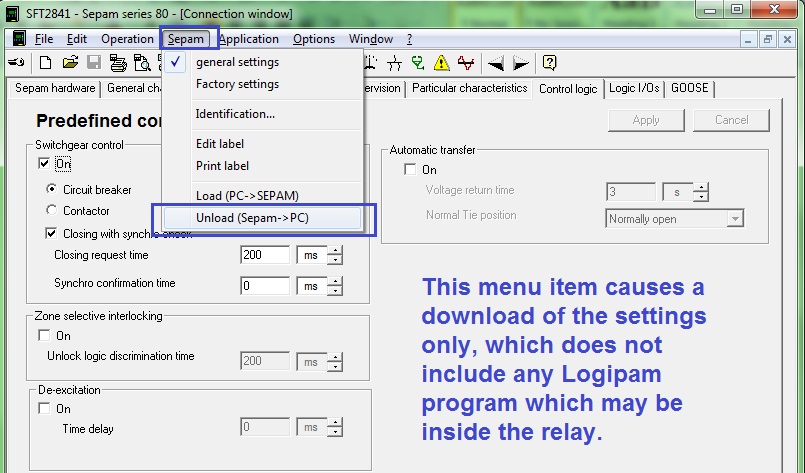
The first image below shows the menu option that can be used to copy the Relay Settings from the relay to your PC.
The next image shows the button in the Logipam tab that can be used to copy the existing Logipam program from the Sepam. This will not happen automatically if you copy only the settings from the relay, and it can lead to confusion when you are trying to view the configuration of the relay off-line.

To summarize, the user should be aware that any Logipam program which may be loaded in the relay will not automatically be copied to your computer when the "Unload Sepam --> PC" menu option is used. The Logipam program must be downloaded separately.
AEDL3
Especially in cases where a custom Logipam program is loaded in the relay, it is helpful to understand how the Relay Settings and Logipam program are managed by the SFT2841 software.
Typically, if you are the only person who loads settings and program logic into your relay, then all of your Logipam files will be saved on your local hard disk at a path such as the one given below:
C:\Program Files\Schneider\SFT2841\Logipam
However, in the case where you are troubleshooting a relay which you did not program, it is necessary to copy the Logipam program and the Relay Settings separately using the SFT2841 software. This is especially important if the person who made the original program may be on vacation or is not available to send you the .BIN files for the Logipam program.
The first image below shows the menu option that can be used to copy the Relay Settings from the relay to your PC.
The next image shows the button in the Logipam tab that can be used to copy the existing Logipam program from the Sepam. This will not happen automatically if you copy only the settings from the relay, and it can lead to confusion when you are trying to view the configuration of the relay off-line.
To summarize, the user should be aware that any Logipam program which may be loaded in the relay will not automatically be copied to your computer when the "Unload Sepam --> PC" menu option is used. The Logipam program must be downloaded separately.
AEDL3