


Video: What is an InRow filter run hour violation and how is it resolved? (Gen 1 POWERVIEW Display Type)
Issue:
What is an InRow filter run hour violation?
Product line:
All InRow Units
Environment:
Data Center Cooling
Cause:
Resolution:
The alarm is an informational alarm indicating the Air Filter run hour counter has exceeded the suggested interval. The default is 18 weeks. This interval can be changed or disabled. The notification does not mean the filters are dirty, but instead is used as a reminder to check the filter for cleanliness.
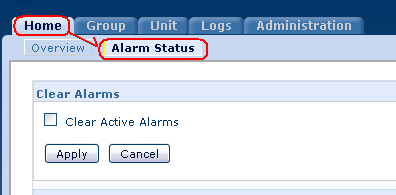
The alarm is cleared by selecting Clear Alarms in the main menu OR via the web browser [see below].
MORE INFORMATION:
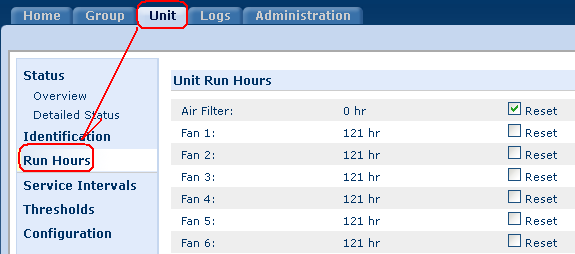
The Cooling Unit records the number of hours each of its components has operated. When a component is replaced, use the Reset option to reset the run hours for the displayed component to zero.
This may be done via the display Main >> View Run Hours >> Air Filter >> Reset Run Hours or the web browser [see below]. Click the reset checkbox, then click Apply to reset a run hour counter back to zero.
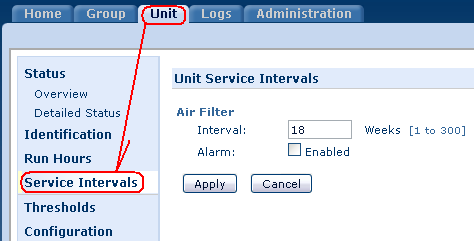
The service interval depends on environmental cleanliness. Each component interval setting has an alarm. If enabled, the alarm will sound when the component interval has elapsed. The alarm is cleared by selecting Clear Alarms in the main menu. Set the number of weeks to service the following:
This may be done via the display Main >> Service Intervals >> Air Filter Interval: The default is 18 weeks. or the web browser [see below]. Enter the number of weeks between air filter service alarms. Enable or disable the air filter service alarm.
What is an InRow filter run hour violation?
Product line:
All InRow Units
Environment:
Data Center Cooling
Cause:
Resolution:
The alarm is an informational alarm indicating the Air Filter run hour counter has exceeded the suggested interval. The default is 18 weeks. This interval can be changed or disabled. The notification does not mean the filters are dirty, but instead is used as a reminder to check the filter for cleanliness.
The alarm is cleared by selecting Clear Alarms in the main menu OR via the web browser [see below].
MORE INFORMATION:
The Cooling Unit records the number of hours each of its components has operated. When a component is replaced, use the Reset option to reset the run hours for the displayed component to zero.
This may be done via the display Main >> View Run Hours >> Air Filter >> Reset Run Hours or the web browser [see below]. Click the reset checkbox, then click Apply to reset a run hour counter back to zero.
The service interval depends on environmental cleanliness. Each component interval setting has an alarm. If enabled, the alarm will sound when the component interval has elapsed. The alarm is cleared by selecting Clear Alarms in the main menu. Set the number of weeks to service the following:
This may be done via the display Main >> Service Intervals >> Air Filter Interval: The default is 18 weeks. or the web browser [see below]. Enter the number of weeks between air filter service alarms. Enable or disable the air filter service alarm.
Released for: Schneider Electric Canada


Need help?
Product Selector
Quickly and easily find the right products and accessories for your applications.
Get a Quote
Start your sales inquiry online and en expert will connect with you.
Where to buy?
Easily find the nearest Schneider Electric distributor in your location.
Help Center
Find support resources for all your needs, in one place.