


How to change the size of the popup window in Vijeo Designer?
Issue:
To show customers how to change the size of a pop up window in Vijeo Designer.
Product Line:
Vijeo Designer
Resolution:
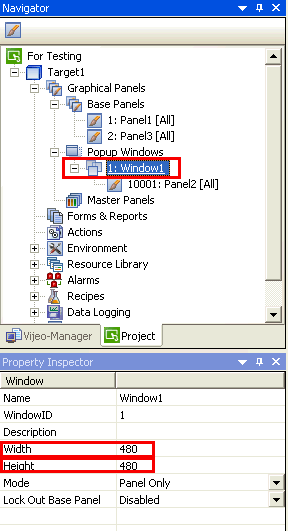
Once you have added a new popup window. Highlight the Window node and go to the Property Inspector Window
(see illustration below). You will see the width and height settings for that particular Popup Panel. You can have a
maximum of 800 pixels for the width and 600 for the height.
To show customers how to change the size of a pop up window in Vijeo Designer.
Product Line:
Vijeo Designer
Resolution:
Once you have added a new popup window. Highlight the Window node and go to the Property Inspector Window
(see illustration below). You will see the width and height settings for that particular Popup Panel. You can have a
maximum of 800 pixels for the width and 600 for the height.
Released for: Schneider Electric Canada
