


Video: Why I am seeing only 2 components of phasor diagram of my delta connected ION meter in ION Setup's phasor view?
Issue
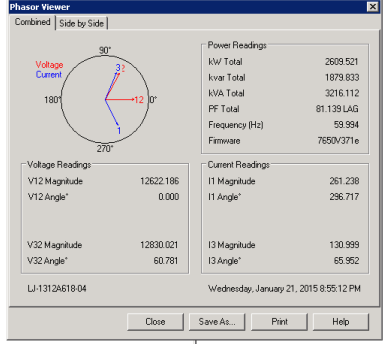
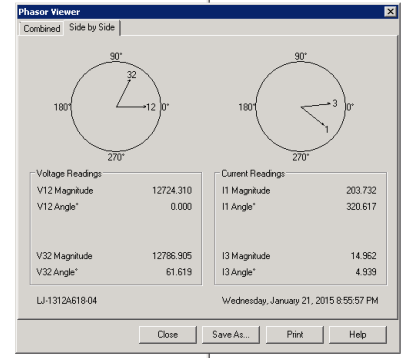
For a delta connected ION meter, the phasor diagram in ION Setup (ION Setup>Setup Assistant>Verification>Wiring>Phasor Viewer), shows only 2 components: (for voltage) V 12 and V 32, (for current) I1 and I3.
Where are the V23 and I2?
Product Line
PM8000, ION7650/7550/7500/7600/73xx/86xx/8500/8400/8300
ION Setup 3.0.x
Environment
ION Setup>Setup Assistant>Verification>Wiring>Phasor Viewer
Cause
ION Setup provides 2 ways to view the phasor diagram for a delta connected ION meter:
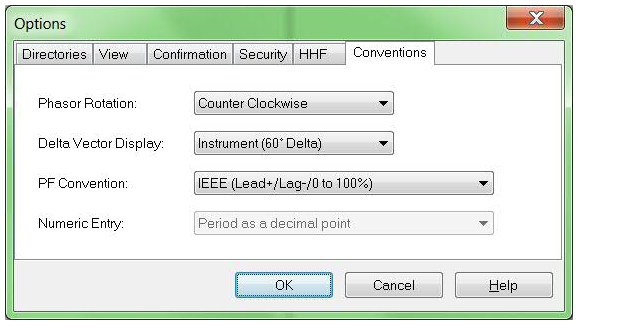
Instrument (60 Delta)
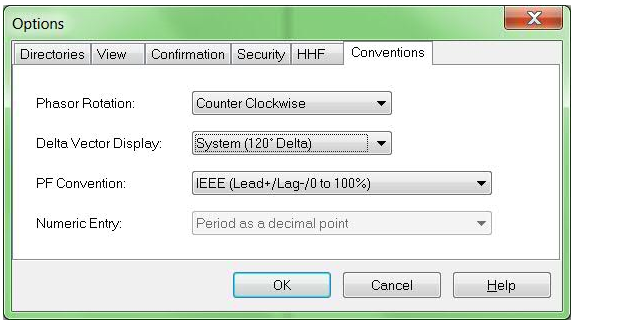
System (120 Delta)
Instrument view corresponds to how an electrician wants to see it (are the meter voltage and current inputs correctly wired up) whereas, system view corresponds to how the phasor diagram should look like on the primary side of the measured system.
By default, the instrument view is selected.
Resolution
Please go to the ION Setup menu bar>Tools>Options>Conventions>Delta Vector Display>(change it to)System (120 Delta).
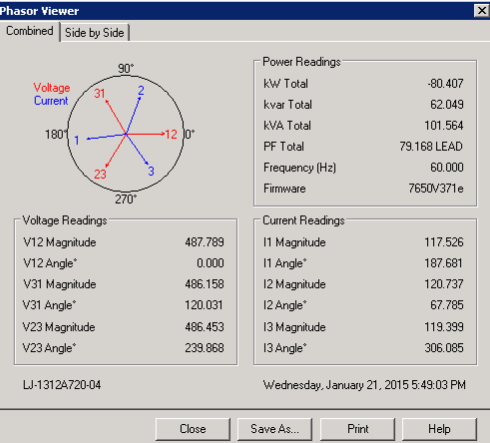
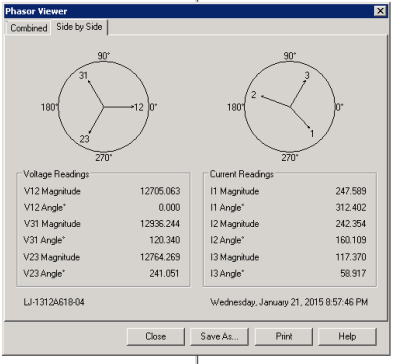
For a delta connected ION meter, the phasor diagram in ION Setup (ION Setup>Setup Assistant>Verification>Wiring>Phasor Viewer), shows only 2 components: (for voltage) V 12 and V 32, (for current) I1 and I3.
Where are the V23 and I2?
Product Line
PM8000, ION7650/7550/7500/7600/73xx/86xx/8500/8400/8300
ION Setup 3.0.x
Environment
ION Setup>Setup Assistant>Verification>Wiring>Phasor Viewer
Cause
ION Setup provides 2 ways to view the phasor diagram for a delta connected ION meter:
Instrument (60 Delta)
System (120 Delta)
Instrument view corresponds to how an electrician wants to see it (are the meter voltage and current inputs correctly wired up) whereas, system view corresponds to how the phasor diagram should look like on the primary side of the measured system.
By default, the instrument view is selected.
Resolution
Please go to the ION Setup menu bar>Tools>Options>Conventions>Delta Vector Display>(change it to)System (120 Delta).
Released for: Schneider Electric Canada


Need help?
Product Selector
Quickly and easily find the right products and accessories for your applications.
Get a Quote
Start your sales inquiry online and en expert will connect with you.
Where to buy?
Easily find the nearest Schneider Electric distributor in your location.
Help Center
Find support resources for all your needs, in one place.