


Why does the FDM128 (LV434128) ask to verify an IP Address different than the one configured during the firmware update?
Issue
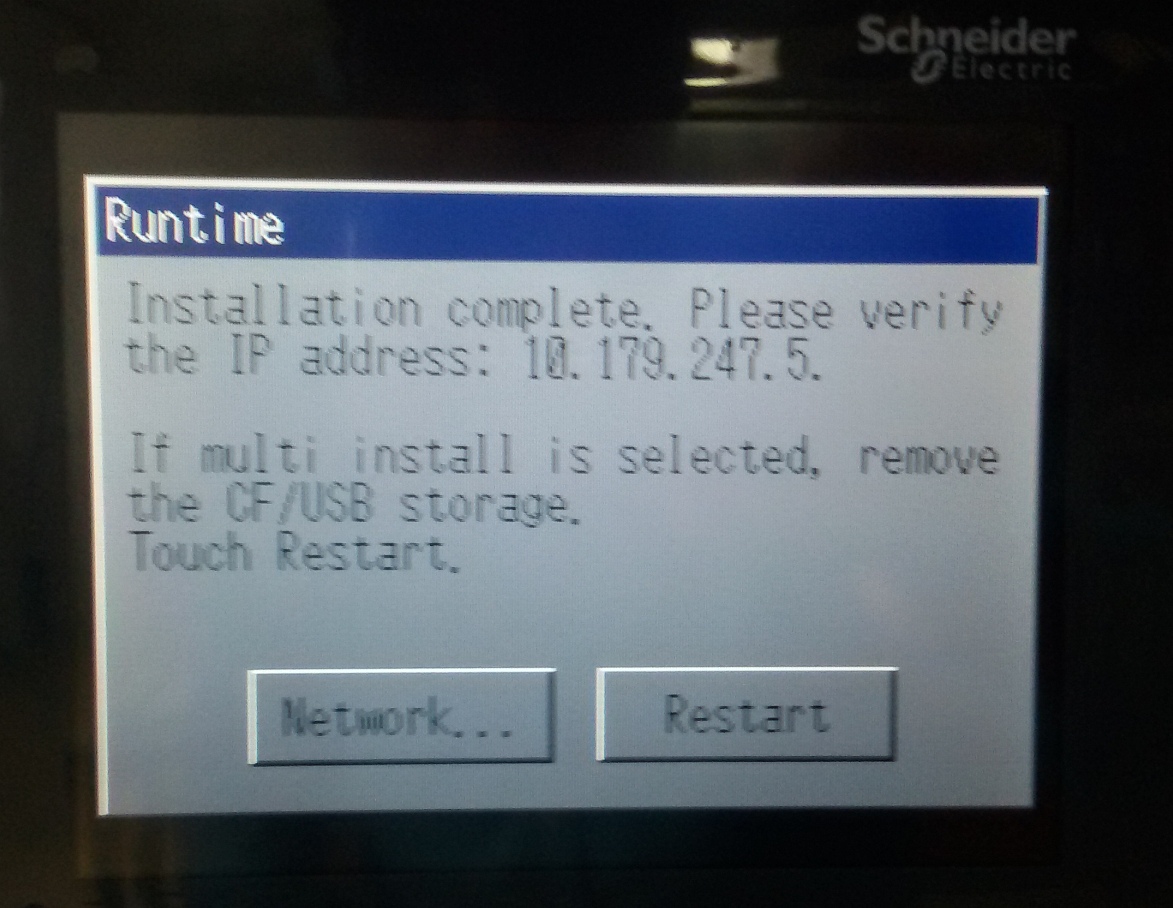
After updating the FDM128, the display shows a Runtime message that asks to verify the IP address that is not the one I configured. After the FDM128 does a power cycle, the configured address is returned to the configured value.
Example screenshot:
Product Line/ Environment
FDM128
Cause
This screen is displayed during the initialization of the Runtime. It displays the hardware's default IP address in the event of a complete recovery. For FDM128 users who have completed the IP Address configuration, this has no impact on the IP Address. The IP Address that was configured will be maintained in memory and will be used after the power cycle to complete the firmware update.
Resolution
Under normal conditions, the IP Address shown in the screen above will not show the configured address in the FDM128.
After updating the FDM128, the display shows a Runtime message that asks to verify the IP address that is not the one I configured. After the FDM128 does a power cycle, the configured address is returned to the configured value.
Example screenshot:
Product Line/ Environment
FDM128
Cause
This screen is displayed during the initialization of the Runtime. It displays the hardware's default IP address in the event of a complete recovery. For FDM128 users who have completed the IP Address configuration, this has no impact on the IP Address. The IP Address that was configured will be maintained in memory and will be used after the power cycle to complete the firmware update.
Resolution
Under normal conditions, the IP Address shown in the screen above will not show the configured address in the FDM128.
Released for: Schneider Electric Canada
