


Unexpected number of leak sensor detected alarm on an ACRC301X.
Issue:
Unexpected number of leak sensor detected alarm on an ACRC301X.
Product line:
ACRC301S, ACRC301H.
Environment:
All Serial Numbers.
Cause:
Install.
Resolution:
How to install the leak detection cable on an ACRC301X without getting an unexpected number of leak sensors detected.
Remove leak sensors from P510 and make sure they are the Netbotz Leak detection cable (NEBS0308). (Figure 1)
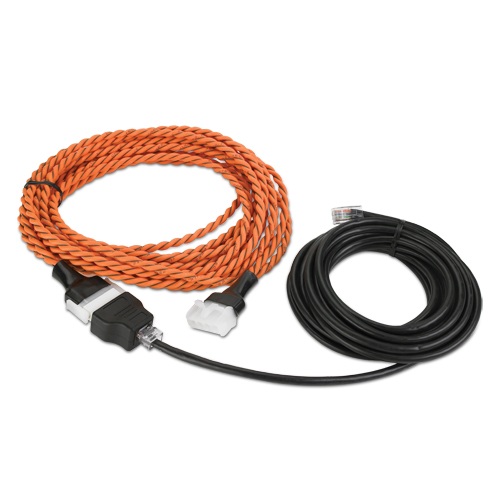
Figure 1
Through the display set the number of leak sensors to zero.
Path Configuration\Unit\Configuration\ Page 4 of 4
Attach leak sensor to the P510 port on the J5 controller.
Press the reset button on the J5 controller located just next to P513 (Figure 2 )
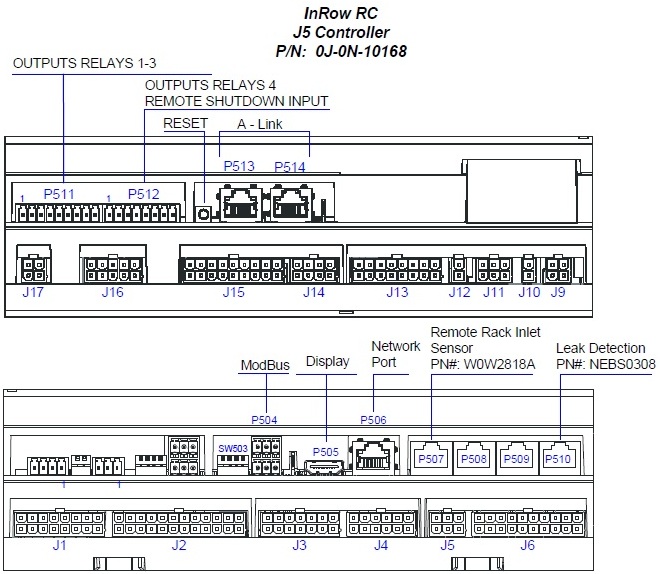
Figure 2
After reboot go into the display and change the number of leak sensors to read 1.
Path Configuration\Unit\Configuration\ Page 4 of 4
Test leak sensor.
Unexpected number of leak sensor detected alarm on an ACRC301X.
Product line:
ACRC301S, ACRC301H.
Environment:
All Serial Numbers.
Cause:
Install.
Resolution:
How to install the leak detection cable on an ACRC301X without getting an unexpected number of leak sensors detected.
Remove leak sensors from P510 and make sure they are the Netbotz Leak detection cable (NEBS0308). (Figure 1)
Figure 1
Through the display set the number of leak sensors to zero.
Path Configuration\Unit\Configuration\ Page 4 of 4
Attach leak sensor to the P510 port on the J5 controller.
Press the reset button on the J5 controller located just next to P513 (Figure 2 )
Figure 2
After reboot go into the display and change the number of leak sensors to read 1.
Path Configuration\Unit\Configuration\ Page 4 of 4
Test leak sensor.
Released for: Schneider Electric Canada
