


Unity Pro: How to create alias on bit of DDDT word
If bit have not be defined in the DDDT, it is not possible to assign an alias to a bit extract of the word. Creating it will lead to a error message like:
{Elementary Variables} : The attribute isn't overloaded. : variable name
or
Alias cannot be set for variables with bit rank attribute: variable name
on a rebuild of the application.
To define bit in the DTM
Access to the parameter of the DTM, and define Item name for the bit which will appear in the DDDT.

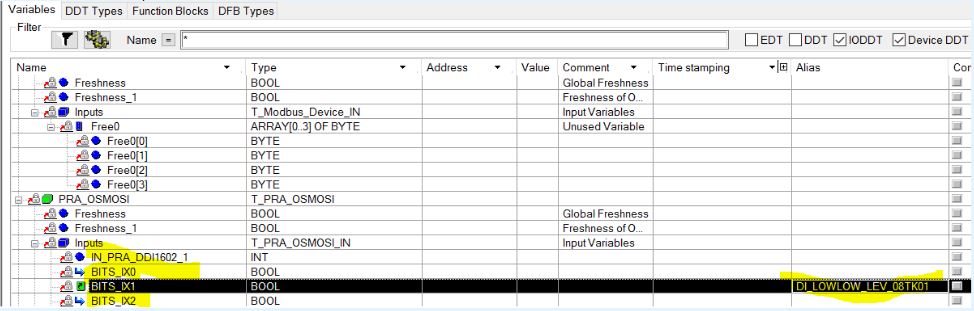
After launching an analyze of the application the bit rank of the word will appear in the DDDT and it will be possible to assign Alias.
{Elementary Variables} : The attribute isn't overloaded. : variable name
or
Alias cannot be set for variables with bit rank attribute: variable name
on a rebuild of the application.
To define bit in the DTM
Access to the parameter of the DTM, and define Item name for the bit which will appear in the DDDT.
After launching an analyze of the application the bit rank of the word will appear in the DDDT and it will be possible to assign Alias.
Released for: Schneider Electric Canada
