


ClearSCADA: determining the number of alarms in a group
There is no single property in ClearSCADA that will provide an alarm count number for an object or group. Rather, this number is made up of several OPC tags (i.e. AlarmAcceptedCount, AlarmClearedCount, AlarmSetCount, etc). As such, the easiest way to determine the number of alarms that have been triggered for an object is to query the Event Journal table. Below is an example of querying for the number of alarms that have occurred in a group over the past 24 hours.
First, a group named '~dolphin' was created containing two internal digital point which were each set to generate an alarm if their value was set to '1'.

Each point was hand controlled a few times to generate some alarms. These can be seen in the event list for the '~dolphin' group below.

Right-clicking on the list and selecting 'Edit query' allows us to see the SQL code used to generate this list:
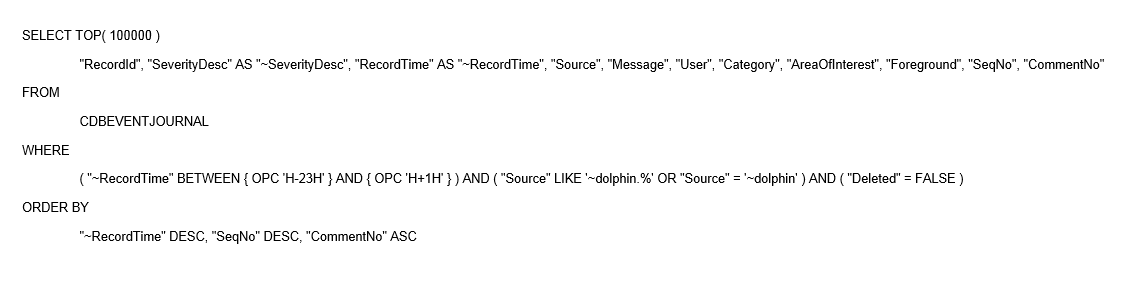
Editing the query as follows modifies the list to only show alarms that have been raised

The result of the query can be seen in this list

Even if an alarm is acknowledged or cleared, the initial 'Alarm raised' message will still appear in the events list for the group or object that is being viewed. This method can be used to determine the number of alarms that occur in a group in a given 24 hour period. The number of alarms is shown in the status ar at the bottom of the ViewX screen while the list is in focus.

First, a group named '~dolphin' was created containing two internal digital point which were each set to generate an alarm if their value was set to '1'.
Each point was hand controlled a few times to generate some alarms. These can be seen in the event list for the '~dolphin' group below.
Right-clicking on the list and selecting 'Edit query' allows us to see the SQL code used to generate this list:
Editing the query as follows modifies the list to only show alarms that have been raised
The result of the query can be seen in this list
Even if an alarm is acknowledged or cleared, the initial 'Alarm raised' message will still appear in the events list for the group or object that is being viewed. This method can be used to determine the number of alarms that occur in a group in a given 24 hour period. The number of alarms is shown in the status ar at the bottom of the ViewX screen while the list is in focus.
Released for: Schneider Electric Canada
