


How to configure Modbus/TCP in BR21 base radio?
The Modbus/TCP Protocol parameters can be only configured remotely using the Enter and Next button.
Procedure to configure the Modbus/TCP protocol parameters.
1. Go to Configuration Menu then Enter password 0000.
2. Select Modbus to configure the TCP IP, Device ID, Modbus Mapping, Modbus Addressing and Byte Order.

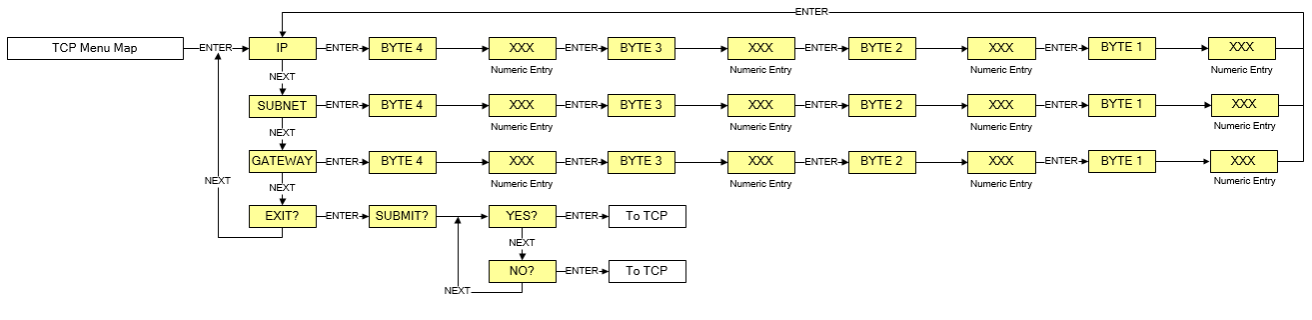
To configure the TCP IP, the IP, subnet and gateway must be entered.
3. Exit when finish.
Procedure to configure the Modbus/TCP protocol parameters.
1. Go to Configuration Menu then Enter password 0000.
2. Select Modbus to configure the TCP IP, Device ID, Modbus Mapping, Modbus Addressing and Byte Order.
To configure the TCP IP, the IP, subnet and gateway must be entered.
3. Exit when finish.
Released for: Schneider Electric Canada
