How can we help you today?

How to Set up Accutech BR21 base radio with Aout/Switch Module

Accutech BR21 with AOUT/Switch Module set up
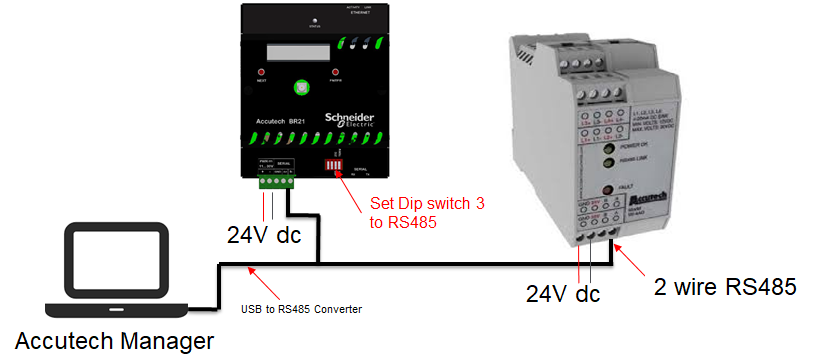
Instructions:
1.Connect the USB to RS485 Converter to the USB computer port.
2.Connect the 2 wire RS485 connector to the A+ and B- terminal of the BR21 Base radio.
3.Set the Dip switch 3 to RS485.
4.Apply power to the BR21 Base radio.
5.Connect the 2 wire RS485 green connector to the + - A B terminal of the Aout/Switch Module.
6.Apply power to the Aout/Switch Module using the bottom terminal.
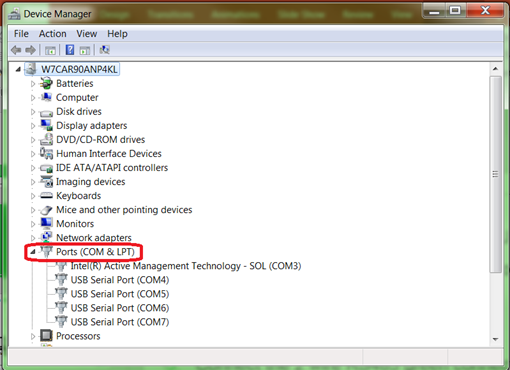
7.Open Device manager, select Ports (COM & LPT) to verify the power created on the USB to RS485 Converter .
8.Open Accutech Manager. Use User: admin and Password: password. Hit connect.
9.At the bottom right corner of the computer screen, right click on the RF Manager service.
10.Select Options.
11.Enter the selected USB to RS485 Converter serial port.
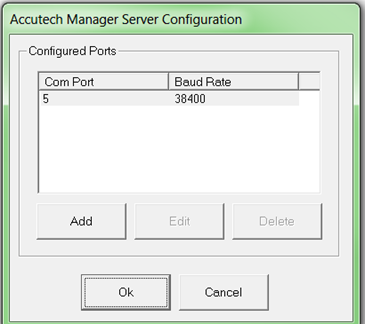
12.Right click on the RF Manager service.
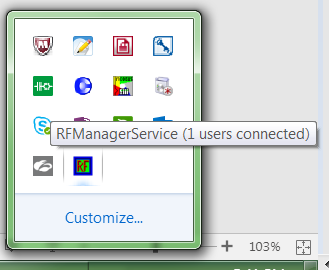
13.Then Restart the server.
14.Finish

Schneider Electric Canada

Explore more
Range:
Users group

Discuss this topic with experts

Visit our community and get advice from experts and peers on this topic and more
Explore more
Range:

Need help?

Need help?

Product Selector

Product Selector

Quickly and easily find the right products and accessories for your applications.

Get a Quote

Get a Quote

Start your sales inquiry online and en expert will connect with you.

Where to buy?

Where to buy?

Easily find the nearest Schneider Electric distributor in your location.

Help Center

Help Center

Find support resources for all your needs, in one place.

  • Help and Contact Center
  • Contact Sales
  • Find our Offices
  • Where to Buy
  • Careers
  • Company Profile
  • Investors
  • Newsroom
  • Report a Misconduct
  • Product Documentation
  • Product Selectors
  • Software and Firmware
  • Product Substitution and Replacement
  • Blog
  • Events
  • Schneider Electric Community
  • Sustainability
  • Legal Information
  • Privacy Policy
  • Cookie Notice
  • Terms of use
  • Change your cookie settings