


How TelePACE Studio can save values (set points) from SCADAPack and then to restore them?
1. Read program from SCADAPack
2. Go in “Monitor” mode
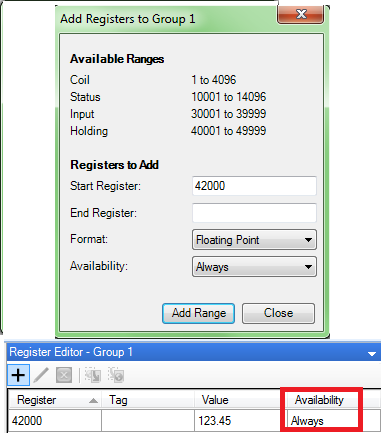
3. Add registers that you want to save to Register Editor with Always in “Availability” field.
4. Go offline
5. Read program from SCADAPack
6. Save and close the program
To test if values are saved do following:
1. Cold boot or initialize ScADAPack from TelePACE studio
2. Open TelePACE file with saved values
3. Write the program to SCADAPack
4. Observe that saved values are written into the modbus registers.
2. Go in “Monitor” mode
3. Add registers that you want to save to Register Editor with Always in “Availability” field.
4. Go offline
5. Read program from SCADAPack
6. Save and close the program
To test if values are saved do following:
1. Cold boot or initialize ScADAPack from TelePACE studio
2. Open TelePACE file with saved values
3. Write the program to SCADAPack
4. Observe that saved values are written into the modbus registers.
Released for: Schneider Electric Canada
