


Sepam is showing a reverse rotation Alarm.
Issue
On the front display of the Sepam it is showing a reverse rotation Alarm.
Product Line
Sepam Series 40
Sepam Series 80
Cause
The Sepam is looking at the voltage phase rotation. On the Sepam 40s it is looking for an ABC rotation. The Sepam 80s it can be wired ABC or ACB.
Resolution
Sepam 40:
The only way to fix the reverse rotation alarm is to re-wire the voltages to an ABC rotation even if its a ACB rotation. To help on the wiring please click here for the Sepam 40 wiring diagram.
Sepam 80:
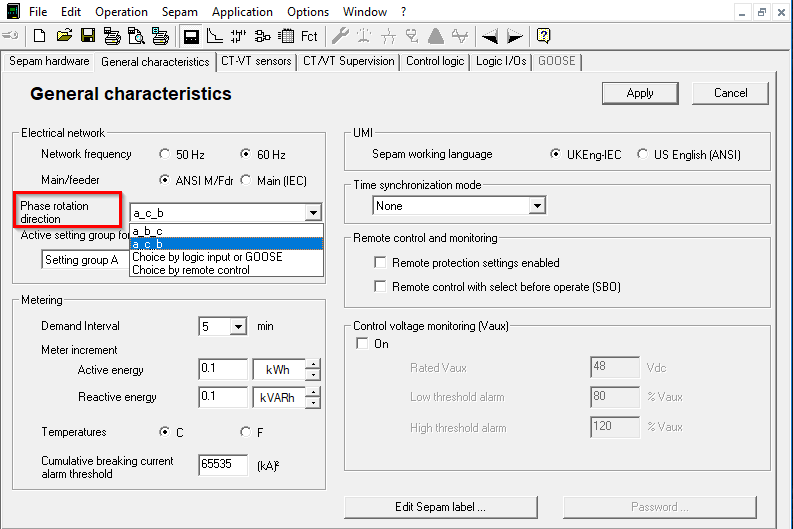
One can just make the changes in SFT2841 by going to the General characteristics tab. In the Electrical network box look for Phase rotation direction and select which rotation is needed.
On the front display of the Sepam it is showing a reverse rotation Alarm.
Product Line
Sepam Series 40
Sepam Series 80
Cause
The Sepam is looking at the voltage phase rotation. On the Sepam 40s it is looking for an ABC rotation. The Sepam 80s it can be wired ABC or ACB.
Resolution
Sepam 40:
The only way to fix the reverse rotation alarm is to re-wire the voltages to an ABC rotation even if its a ACB rotation. To help on the wiring please click here for the Sepam 40 wiring diagram.
Sepam 80:
One can just make the changes in SFT2841 by going to the General characteristics tab. In the Electrical network box look for Phase rotation direction and select which rotation is needed.
Released for: Schneider Electric Canada
