


How to communicate with the Series 4000/7000 Group 5 controller via RS485?
Using ASCO 5170 (72EE2) QEM
ASCO 5170 QEM by default is configured for Ethernet communication. It should be configured first for Serial communication.
Here are the steps:
1. Open QEM.
2. Move jumper J203 to the left. This will activate Serial mode.
3. Move jumper J207 to the left. This will activate the RS-485 port.

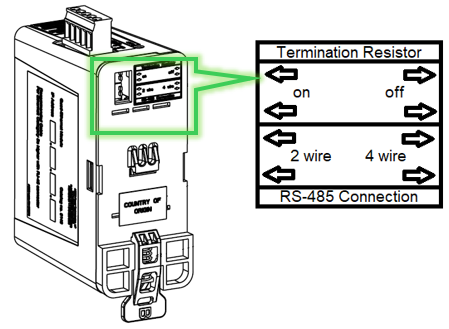
After activating the Serial mode and RS-485 port. The following should be set accordingly:
1. Termination Resistor
2. RS-458 Connection
The next steps are to be configured on the Group 5 controller.
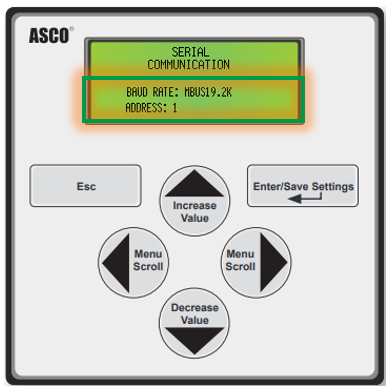
1. On Group 5 controller, go to Main Menu ➡ Settings ➡ General ➡ Serial Communication.
2. Select baud rate with MBUS prefix.
3. Enter the appropriate device address.
Refer to the Modus Register Map document (381339-221) for Group 5 Holding Register addresses.


ASCO 5170 QEM by default is configured for Ethernet communication. It should be configured first for Serial communication.
Here are the steps:
1. Open QEM.
2. Move jumper J203 to the left. This will activate Serial mode.
3. Move jumper J207 to the left. This will activate the RS-485 port.
After activating the Serial mode and RS-485 port. The following should be set accordingly:
1. Termination Resistor
2. RS-458 Connection
The next steps are to be configured on the Group 5 controller.
1. On Group 5 controller, go to Main Menu ➡ Settings ➡ General ➡ Serial Communication.
2. Select baud rate with MBUS prefix.
3. Enter the appropriate device address.
Refer to the Modus Register Map document (381339-221) for Group 5 Holding Register addresses.
Released for: Schneider Electric Canada
