How can we help you today?

Cannot open JAVA web pages with Microsoft Edge

The reason why the JAVA web pages for the M580, M340 and Quantum Ethernet modules cannot be opened in Microsoft Edge  (IP address has been added to the Site Exception list for JAVA) is due to:
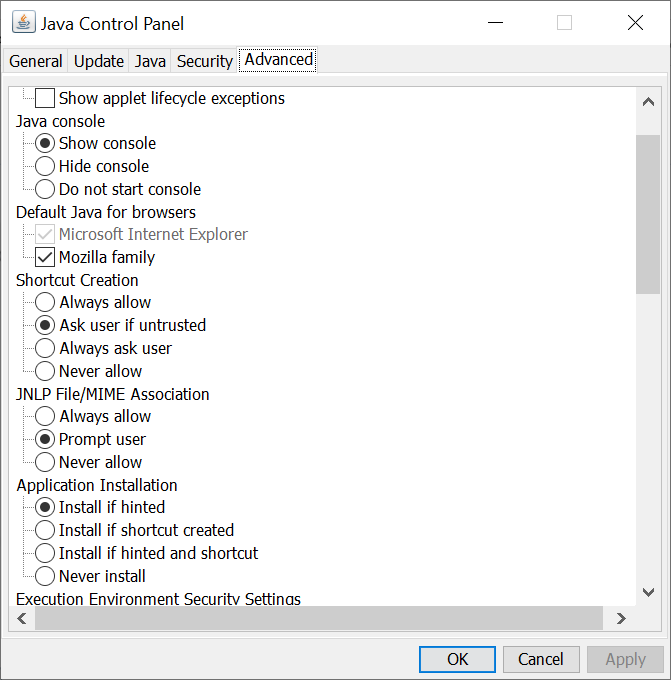
  • JAVA console being blocked by Microsoft Edge.
  • Microsoft Edge does not support JAVA.
  • JAVA does not support Microsoft Edge as a browser:
jc


To resolve the issue, use the following steps as a workaround.
  • Open the JAVA control panel and enable the JAVA console.
  • Click on OK

jc1

  • Open the Microsoft Edge settings.
  • Click on Default Browser.
  • Set the 'Internet Explorer compatibility for 'Let Internet Explorer open sites in Microsoft Edge' to Never.

s1

  • Open Internet Explorer.
  • Navigate to the JAVA web page for the Ethernet module (The JAVA console panel should appear.)

s2

  • Wait for the security warning to appear
  • Click on 'Accept the risk and want to run the application.'

s4

Schneider Electric Canada

Explore more
Product:
Users group

Discuss this topic with experts

Visit our community and get advice from experts and peers on this topic and more
Explore more
Product:

Need help?

Need help?

Product Selector

Product Selector

Quickly and easily find the right products and accessories for your applications.

Get a Quote

Get a Quote

Start your sales inquiry online and en expert will connect with you.

Where to buy?

Where to buy?

Easily find the nearest Schneider Electric distributor in your location.

Help Center

Help Center

Find support resources for all your needs, in one place.

  • Help and Contact Center
  • Contact Sales
  • Find our Offices
  • Where to Buy
  • Careers
  • Company Profile
  • Investors
  • Newsroom
  • Report a Misconduct
  • Product Documentation
  • Product Selectors
  • Software and Firmware
  • Product Substitution and Replacement
  • Blog
  • Events
  • Schneider Electric Community
  • Sustainability
  • Legal Information
  • Privacy Policy
  • Cookie Notice
  • Terms of use
  • Change your cookie settings