How can we help you today?

Zelio Logic - How to measure a temperature with a PT100 connected to the SR3XT43BD extension module?

First, from the Analog extension configuration screen, select PT100 for the Input IJ:
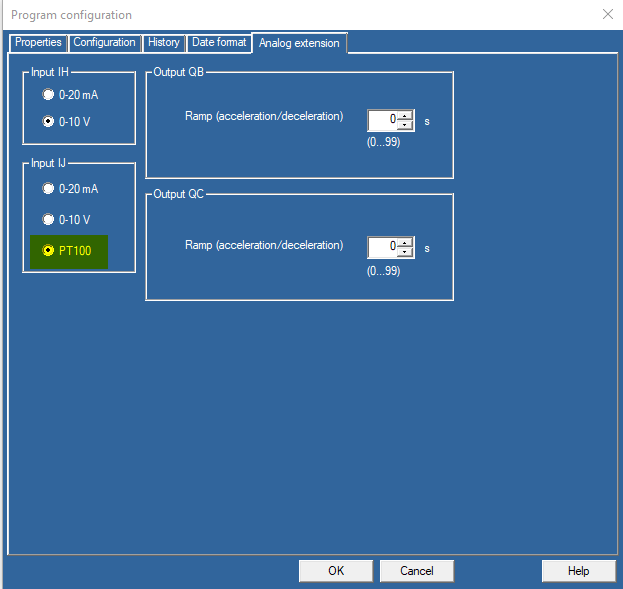
Program configuration

Then, a GAIN function block is needed to apply the following formula :

T° = (( IJ x 150 ) / 1023) - 25

because the scale is:

-25°C => IJ=0
+125°C => IJ=1023


In consequence, the GAIN function has to be configured like below:

Gain


In Monitoring, we can see the read temperature is 24°C when the input value is 337:

Monitoring


Wiring:

  • 1rst red wire connected to IJ
  • 2nd red wire connected to Pt
  • White wire connected to 0v


Wiring

Schneider Electric Canada

Explore more
Range:
Users group

Discuss this topic with experts

Visit our community and get advice from experts and peers on this topic and more
Explore more
Range:

Need help?

Need help?

Product Selector

Product Selector

Quickly and easily find the right products and accessories for your applications.

Get a Quote

Get a Quote

Start your sales inquiry online and en expert will connect with you.

Where to buy?

Where to buy?

Easily find the nearest Schneider Electric distributor in your location.

Help Center

Help Center

Find support resources for all your needs, in one place.

  • Help and Contact Center
  • Contact Sales
  • Find our Offices
  • Where to Buy
  • Careers
  • Company Profile
  • Investors
  • Newsroom
  • Report a Misconduct
  • Product Documentation
  • Product Selectors
  • Software and Firmware
  • Product Substitution and Replacement
  • Blog
  • Events
  • Schneider Electric Community
  • Sustainability
  • Legal Information
  • Privacy Policy
  • Cookie Notice
  • Terms of use
  • Change your cookie settings