¿Cómo podemos ayudarte hoy?

How to Set up Accutech BR21 base radio with Aout/Switch Module

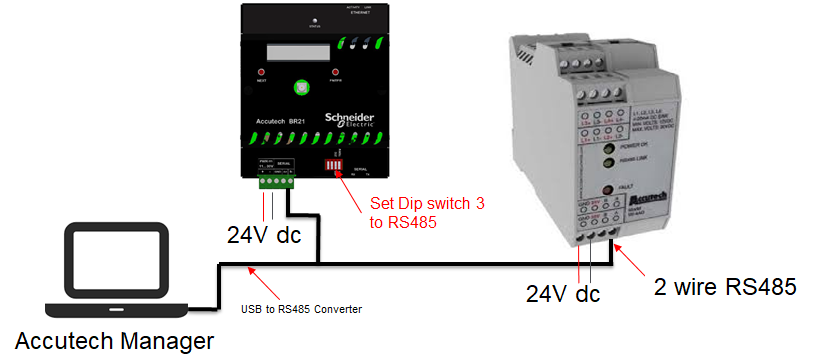
Accutech BR21 with AOUT/Switch Module set up
Instructions:
1.Connect the USB to RS485 Converter to the USB computer port.
2.Connect the 2 wire RS485 connector to the A+ and B- terminal of the BR21 Base radio.
3.Set the Dip switch 3 to RS485.
4.Apply power to the BR21 Base radio.
5.Connect the 2 wire RS485 green connector to the + - A B terminal of the Aout/Switch Module.
6.Apply power to the Aout/Switch Module using the bottom terminal.
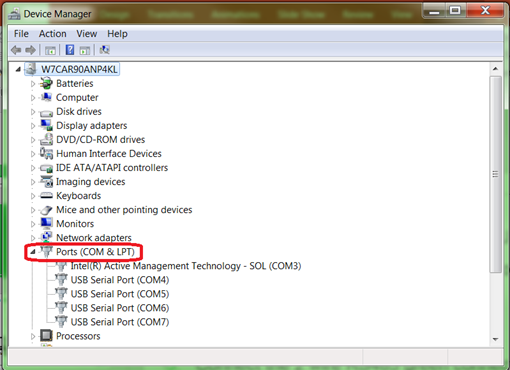
7.Open Device manager, select Ports (COM & LPT) to verify the power created on the USB to RS485 Converter .
8.Open Accutech Manager. Use User: admin and Password: password. Hit connect.
9.At the bottom right corner of the computer screen, right click on the RF Manager service.
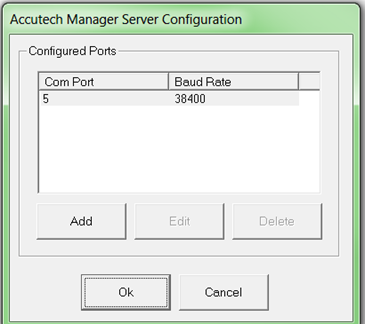
10.Select Options.
11.Enter the selected USB to RS485 Converter serial port.
12.Right click on the RF Manager service.
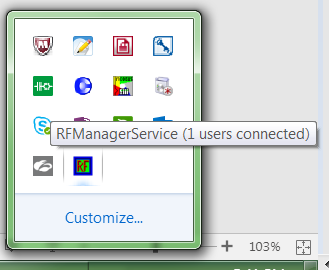
13.Then Restart the server.
14.Finish

Schneider Electric Mexico

Explora más
Rango:
Explora más
Rango:

¿Necesitas ayuda?

¿Necesitas ayuda?

Selector de productos

Selector de productos

Encuentra rápida y fácilmente los productos y accesorios adecuados para tus aplicaciones.

Pedir presupuesto

Pedir presupuesto

Comienza tu consulta de ventas en línea y un experto se pondrá en contacto contigo.

¿Dónde comprar?

¿Dónde comprar?

Encuentra fácilmente el distribuidor de Schneider Electric más cercano a ti.

Centro de ayuda

Centro de ayuda

Encuentra recursos de soporte para todas tus necesidades en un solo lugar.

  • Documentación de productos
  • Descargas de software
  • Selector de productos
  • Sustitución y reemplazo de productos
  • Centro de ayuda y contacto
  • Encuentra nuestras oficinas
  • Obtén un presupuesto
  • Dónde comprar
  • Comunidad Schneider Electric
  • Empleo
  • Perfil corporativo
  • Informar una conducta indebida
  • Accesibilidad
  • Sala de redacción
  • Inversores
  • EcoStruxure
  • Búsqueda de empleo
  • Blog
  • Política de privacidad
  • Aviso de Cookies
  • Términos y condiciones
  • Change your cookie settings