


How create a visibility condition based off of an Int Value In EcoStruxure Operator Terminal Expert
Issue:
Looking for a way to control visibility with an INT variable in EcoStruxure Operator Terminal Expert
Product Line:
EcoStruxure Operator Terminal Expert
Resolution:
In order to control an object's visibility with an INT variable, we can make use of Scripting to control the Visibility property or use a Converter.
Scripting solution:
For Scripting, first we must setup the object's Visbility property to use a Value from a BOOL variable (as illustrated below)
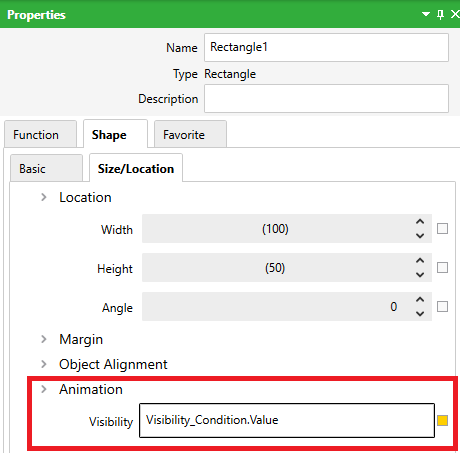
Note: We need to assign a BOOL Variable to the Visibility condition. It does not accept any other type.
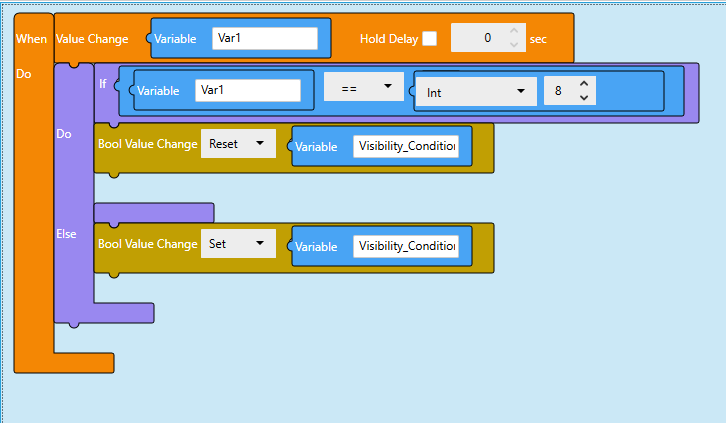
In order to control the Visibility with an INT value, we need to write the following Blockly Script. Note that our variable to monitor is named "Var1" and for this example, we care for the value of "8" to show the object and hide the object for any other value.
Converter solution:
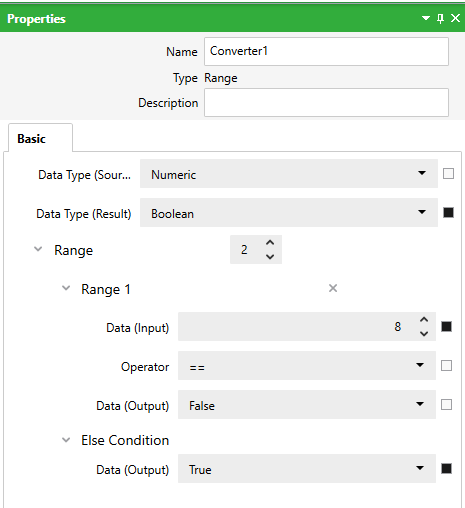
An alternative to this script is to create a converter as follows:
Once the converter is created, you can assign any INT variable to the object's visibility condition as follows:
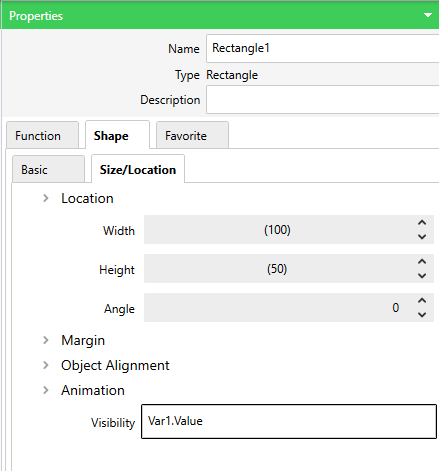
Note that both the Scripting and Converter solution will achieve the same results.
Looking for a way to control visibility with an INT variable in EcoStruxure Operator Terminal Expert
Product Line:
EcoStruxure Operator Terminal Expert
Resolution:
In order to control an object's visibility with an INT variable, we can make use of Scripting to control the Visibility property or use a Converter.
Scripting solution:
For Scripting, first we must setup the object's Visbility property to use a Value from a BOOL variable (as illustrated below)
Note: We need to assign a BOOL Variable to the Visibility condition. It does not accept any other type.
In order to control the Visibility with an INT value, we need to write the following Blockly Script. Note that our variable to monitor is named "Var1" and for this example, we care for the value of "8" to show the object and hide the object for any other value.
Converter solution:
An alternative to this script is to create a converter as follows:
Once the converter is created, you can assign any INT variable to the object's visibility condition as follows:
Note that both the Scripting and Converter solution will achieve the same results.
Publicado para: Schneider Electric Mexico

¿Necesitas ayuda?
Selector de productos
Encuentra rápida y fácilmente los productos y accesorios adecuados para tus aplicaciones.
Pedir presupuesto
Comienza tu consulta de ventas en línea y un experto se pondrá en contacto contigo.
¿Dónde comprar?
Encuentra fácilmente el distribuidor de Schneider Electric más cercano a ti.
Centro de ayuda
Encuentra recursos de soporte para todas tus necesidades en un solo lugar.