


How do I upgrade the firmware of the BMXAMI0810 Analog input module?
Issue:
Upgrading the firmware of the BMXAMI0810 Analog input module
Product Line:
BMXAMI0810
Resolution:
To upgrade the firmware of the BMXAMI0810 module follow the steps below:
1. Take note of the Rack and Slot number of the BMXAMI0810 module in Unity pro/EcoStruxure Control Expert. In this example, the module is located in rack 0 slot 3

2. Launch Unity loader and select the "firmware" tab and browse to location of the firmware file. Then select the "Module" check box then enter module's rack and slot number. Then select connect. In this example I connected via USB with Address = SYS

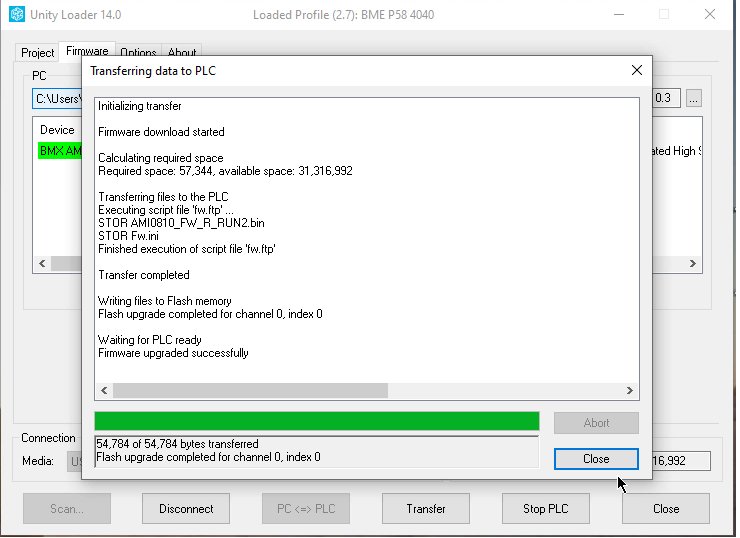
3. You should see the firmware download started and the progress bar showing as indicated below.

4. When the firmware is completed, you will see the "Close" button highlighted. When the firmware download is in progress, this button is greyed out
Upgrading the firmware of the BMXAMI0810 Analog input module
Product Line:
BMXAMI0810
Resolution:
To upgrade the firmware of the BMXAMI0810 module follow the steps below:
1. Take note of the Rack and Slot number of the BMXAMI0810 module in Unity pro/EcoStruxure Control Expert. In this example, the module is located in rack 0 slot 3
2. Launch Unity loader and select the "firmware" tab and browse to location of the firmware file. Then select the "Module" check box then enter module's rack and slot number. Then select connect. In this example I connected via USB with Address = SYS
3. You should see the firmware download started and the progress bar showing as indicated below.
4. When the firmware is completed, you will see the "Close" button highlighted. When the firmware download is in progress, this button is greyed out