


Hvordan kan vi hjelpe deg i dag?
String value incorrectly shown as an integer in the OPC UA Sample Client.
Issue
String value incorrectly shown as an integer in the OPC UA Sample Client.
Product Line
OFS
Environment
Windows 10
Resolution
If you view the 'Node Attributes' for a symbol that is defined as a string, it is incorrectly shown as an integer in the
OPC UA Sample Client.
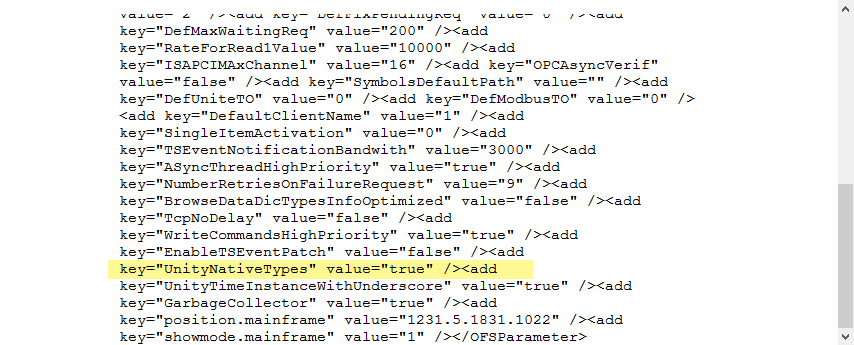
The following steps will demonstrate how to correct the issue:


String value incorrectly shown as an integer in the OPC UA Sample Client.
Product Line
OFS
Environment
Windows 10
Resolution
If you view the 'Node Attributes' for a symbol that is defined as a string, it is incorrectly shown as an integer in the
OPC UA Sample Client.
The following steps will demonstrate how to correct the issue:
- Navigate to 'C:\ProgramData\Schneider Electric\OFS\3.60.0.0'
- Open and edit the file named OFSInternal.xml' using 'wordpad'
- Locate the text "UnityNativeTypes" value="false"
- Change the text to "UnityNativeTypes" value="true"
- Save the changes.
- Run a test
Publisert for: Schneider Electric Norway
Finn ut mer
Produktfamilie:
Finn ut mer
Produktfamilie:
Trenger du hjelp?
Produktvelger
Velg riktige produkt og kompatibelt tilbehør raskt og enkelt.
Be om tilbud
Start din salgsforespørsel online, og vi vil kontakte deg.
Hvor kan du handle?
Finn din nærmeste Schneider Electric-distributør enkelt.
Hjelpesenter
Finn alle nødvendige supportressurser samlet på ett sted.