


How do you set a Modem EVP3MM with EVlink Pro AC ?
Using eSetup, the installer sets the IP address (192.168.0.254 by default) of the EVP3MM modem in the Gateway line of each EVlink Pro AC connected to Network 1.
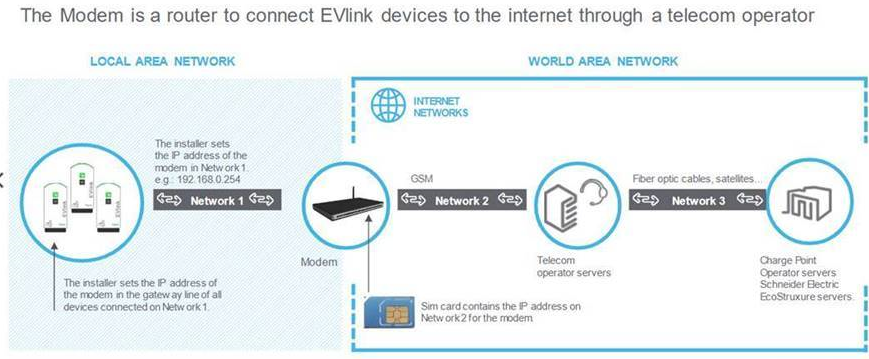
In the EVP3MM Modem, the installer needs to set the Telecom informations operator (APN) Network 2 given with the SIM card.
Insert the SIM card into the EVP3MM and ping with your browser the Modem https://192.168.0.254 (by default).
In the EVP3MM menu, set the Cellular Configuration.
EVlink Pro AC is compliant with OCPP 1.6 over websocket.
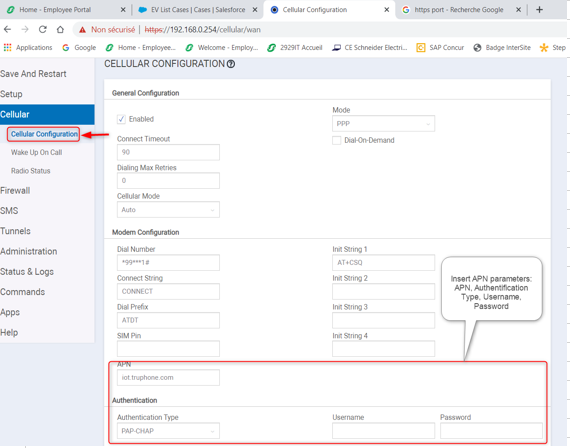
In the EVP3MM Modem, the installer needs to set the Telecom informations operator (APN) Network 2 given with the SIM card.
Insert the SIM card into the EVP3MM and ping with your browser the Modem https://192.168.0.254 (by default).
In the EVP3MM menu, set the Cellular Configuration.
EVlink Pro AC is compliant with OCPP 1.6 over websocket.