


How to import RealFLO Derived Function Blocks into RemoteConnect Logic application?
1. Install RealFLO software
2. Open RemoteConnect software and then open or create project.
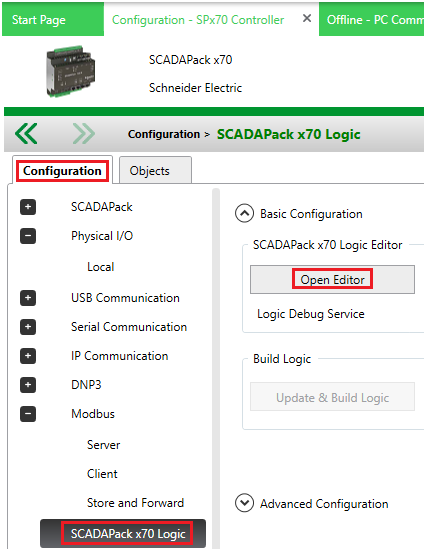
3. Open SCADAPack x70 Logic Editor
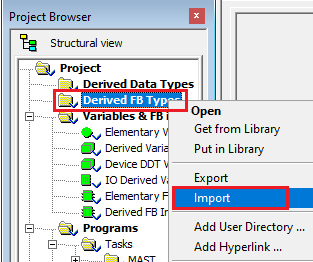
4. Right-click on “Derived FB Types” and then select “Import” option
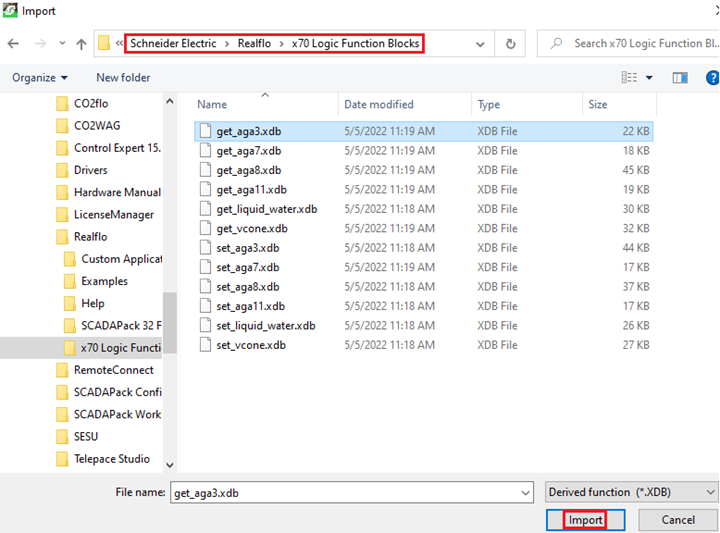
5. Select RealFLO Derived Function block which you want to import and click on Import button
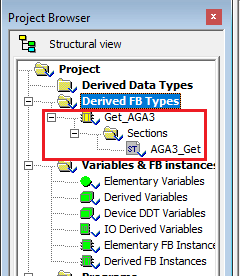
6. Verify that selected/imported RealFLO DFB is added to Derived FB Types
2. Open RemoteConnect software and then open or create project.
3. Open SCADAPack x70 Logic Editor
4. Right-click on “Derived FB Types” and then select “Import” option
5. Select RealFLO Derived Function block which you want to import and click on Import button
6. Verify that selected/imported RealFLO DFB is added to Derived FB Types