


How can we help you today?
How to communicate with the Series 4000/7000 Group 5 controller via RS485?
Using ASCO 5170 (72EE2) QEM
ASCO 5170 QEM by default is configured for Ethernet communication. It should be configured first for Serial communication.
Here are the steps:
1. Open QEM.
2. Move jumper J203 to the left. This will activate Serial mode.
3. Move jumper J207 to the left. This will activate the RS-485 port.

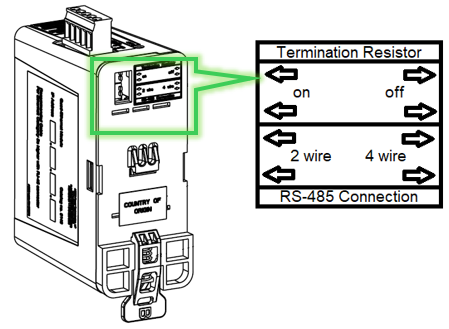
After activating the Serial mode and RS-485 port. The following should be set accordingly:
1. Termination Resistor
2. RS-458 Connection
The next steps are to be configured on the Group 5 controller.
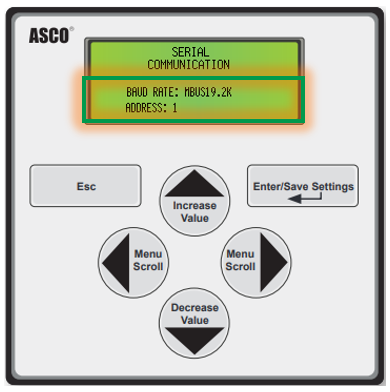
1. On Group 5 controller, go to Main Menu ➡ Settings ➡ General ➡ Serial Communication.
2. Select baud rate with MBUS prefix.
3. Enter the appropriate device address.
Refer to the Modus Register Map document (381339-221) for Group 5 Holding Register addresses.


ASCO 5170 QEM by default is configured for Ethernet communication. It should be configured first for Serial communication.
Here are the steps:
1. Open QEM.
2. Move jumper J203 to the left. This will activate Serial mode.
3. Move jumper J207 to the left. This will activate the RS-485 port.
After activating the Serial mode and RS-485 port. The following should be set accordingly:
1. Termination Resistor
2. RS-458 Connection
The next steps are to be configured on the Group 5 controller.
1. On Group 5 controller, go to Main Menu ➡ Settings ➡ General ➡ Serial Communication.
2. Select baud rate with MBUS prefix.
3. Enter the appropriate device address.
Refer to the Modus Register Map document (381339-221) for Group 5 Holding Register addresses.
Released for: Schneider Electric New Zealand
Explore more
Range:

Explore more
Range:
Need help?
Product Selector
Quickly and easily find the right products and accessories for your applications.
Get a Quote
Start your sales inquiry online and an expert will connect with you.
Where to buy?
Easily find the nearest Schneider Electric distributor in your location.
Help Centre
Find support resources for all your needs, in one place.