


How can we help you today?
Modbus Ethernet Communication Setup for Modicon M221 in Vijeo Designer
To configure the Modbus Ethernet Server of the Modicon M221,
1) Open the .SMBP project for the M221 in EcoStruxure Machine Expert-Basic
2) Go to the green Configuration Tab
3) Expand the "MyController" node
4) Click on "ETH1" to select it
5) Set up a Fixed IP Address, Subnet Mask, and Gateway Address as desired
6) Ensure that "Modbus server enabled" has a tickmark in the checkbox
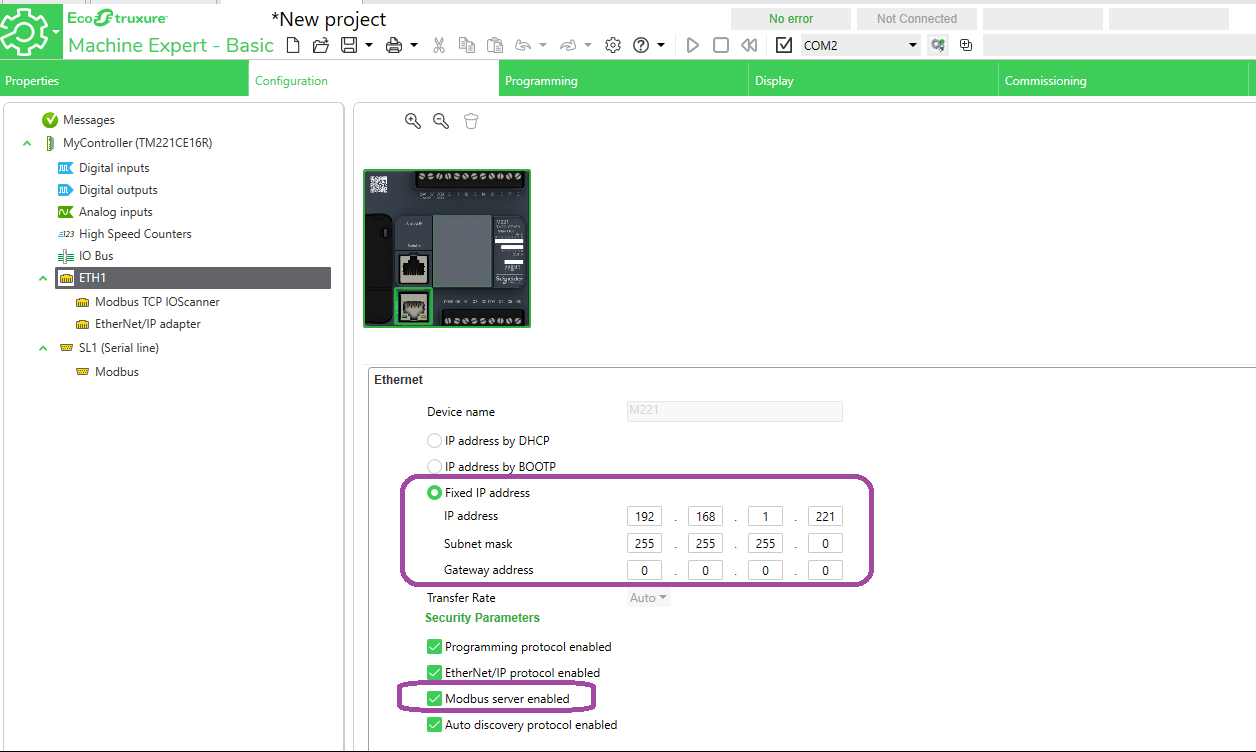
7) Download the changes to the PLC.
In Vijeo Designer, to configure the HMI, take the following steps:
1) In the Project tab of the Navigator window, right-click on IO Manager
2) Add the Modbus TCP/IP Driver
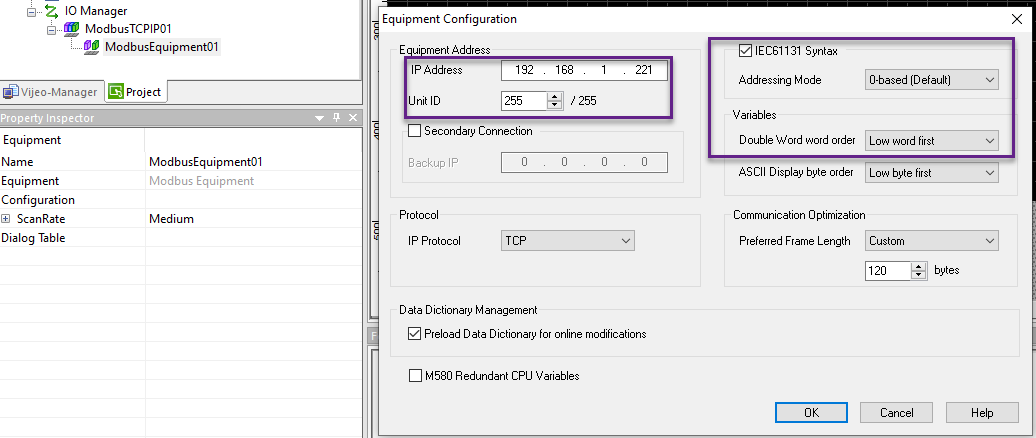
3) Double-click on the "ModbusEquipment01" node to bring up the "Equipment Configuration" dialog.
4) Set the IP Address to match that of the M221
5) Set the Unit ID to be 255 (that is the default Unit ID of the M221)
6) Tick the checkbox for "IEC61131 Syntax" (this will use %M and %MW notation for Device Addresses)
7) Under "Variables", set the "Double Word word order" to be "Low word first" (this is the word order for 32-bit Variables such as REAL types)
1) Open the .SMBP project for the M221 in EcoStruxure Machine Expert-Basic
2) Go to the green Configuration Tab
3) Expand the "MyController" node
4) Click on "ETH1" to select it
5) Set up a Fixed IP Address, Subnet Mask, and Gateway Address as desired
6) Ensure that "Modbus server enabled" has a tickmark in the checkbox
7) Download the changes to the PLC.
In Vijeo Designer, to configure the HMI, take the following steps:
1) In the Project tab of the Navigator window, right-click on IO Manager
2) Add the Modbus TCP/IP Driver
3) Double-click on the "ModbusEquipment01" node to bring up the "Equipment Configuration" dialog.
4) Set the IP Address to match that of the M221
5) Set the Unit ID to be 255 (that is the default Unit ID of the M221)
6) Tick the checkbox for "IEC61131 Syntax" (this will use %M and %MW notation for Device Addresses)
7) Under "Variables", set the "Double Word word order" to be "Low word first" (this is the word order for 32-bit Variables such as REAL types)
Released for: Schneider Electric New Zealand
Explore more
Product:

Explore more
Product:
Need help?
Product Selector
Quickly and easily find the right products and accessories for your applications.
Get a Quote
Start your sales inquiry online and an expert will connect with you.
Where to buy?
Easily find the nearest Schneider Electric distributor in your location.
Help Centre
Find support resources for all your needs, in one place.