


Video: Why is the Micrologic Trip Unit Type P or H reading negative power?
Product Line
Micrologic Trip Unit Type P and H
Breakers: Powerpact P and R Frames, Masterpact NT and NW, Compact NS630B- NS3200
Environment
Micrologic Trip Unit Type P and H
Cause
The power readings from the device are all negative, yet all of the voltages and currents are positive numbers.
Resolution
The power sign must be changed to accommodate this issue. The power sign has two different settings: (+) and (-). The (+) setting implies that power is absorbed from upstream to downstream (meaning it is top-fed). The (-) setting implies that power is absorbed from downstream to upstream (meaning it is bottom-fed).
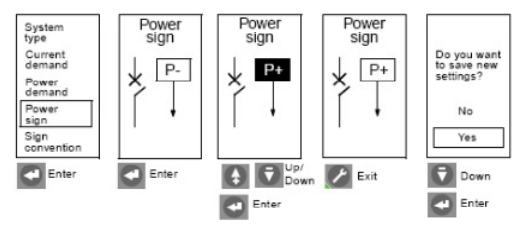
The power sign can only be changed from the front panel of the Trip Unit. From the main menu go to either the Micrologic Setup or Metering Setup menus then follow the steps in the diagrams below. In order to change settings via the menu buttons on the trip unit, the trip unit must be energized AND the door over the adjustment dials MUST be OPEN.
To change the power sign:
For further information about the Micrologic Trip Units Type P and H see link for the instruction bulletins below.
Powerpact P, R, and Masterpact NW, NT Micrologic™ 5.0P and 6.0P Trip Units, see 48049-137-05
Powerpact P, R, and Masterpact NW, NT Micrologic™ 5.0H and 6.0H Trip Units, see 48049-330-03
Micrologic Trip Unit Type P and H
Breakers: Powerpact P and R Frames, Masterpact NT and NW, Compact NS630B- NS3200
Environment
Micrologic Trip Unit Type P and H
Cause
The power readings from the device are all negative, yet all of the voltages and currents are positive numbers.
Resolution
The power sign must be changed to accommodate this issue. The power sign has two different settings: (+) and (-). The (+) setting implies that power is absorbed from upstream to downstream (meaning it is top-fed). The (-) setting implies that power is absorbed from downstream to upstream (meaning it is bottom-fed).
The power sign can only be changed from the front panel of the Trip Unit. From the main menu go to either the Micrologic Setup or Metering Setup menus then follow the steps in the diagrams below. In order to change settings via the menu buttons on the trip unit, the trip unit must be energized AND the door over the adjustment dials MUST be OPEN.
To change the power sign:
- Press the Wrench menu button
- Select Micrologic Setup
- Select Power Sign
- Open the trip unit door (see video for details)
- Toggle power sign with up or down arrow
- Press Enter to select sign
- Press Wrench button to exit
- Select YES to save settings on exit
For further information about the Micrologic Trip Units Type P and H see link for the instruction bulletins below.
Powerpact P, R, and Masterpact NW, NT Micrologic™ 5.0P and 6.0P Trip Units, see 48049-137-05
Powerpact P, R, and Masterpact NW, NT Micrologic™ 5.0H and 6.0H Trip Units, see 48049-330-03