


PME 2020 - Color key icons missing in the legend in the Trends tab of the Web Applications
Issue
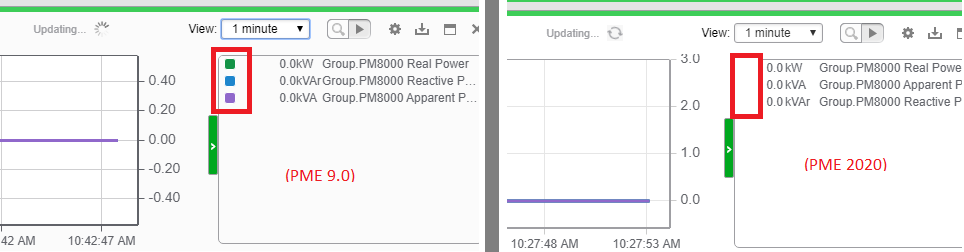
In the PME 2020 Web Applications, the color icons that indicate which trend line corresponds to each source are not shown.
Product Line
Power Monitoring Expert 2020
Environment
Web Applications Trends
Resolution
*Warning: Take backups of any files prior to modifying them. Ensure the backups are in a location that will not be overwritten (i.e. the Desktop).
This was corrected in PME 2020 Cumulative Update 1 (CU1), which is included in CU3 downloaded from this link. If for some reason the cumulative update cannot be applied, below is a workaround to resolve the issue:
1. Locate the following file: …\Program Files(x86)\Schneider Electric\Power Monitoring Expert\Applications\SystemDataService\Content\Applications\Trends\Styles\TrendsChart.css
2. Make a backup of the original file: TrendsChart.css.original
3. Append the following CSS rule to the bottom of the file:
td.rtTableColor .colorSwatch { height:10px;width:10px; }
4. Save and close the file.
5. Clear the browser cache, then refresh PME in the browser with a hard refresh (CTRL+F5).
In the PME 2020 Web Applications, the color icons that indicate which trend line corresponds to each source are not shown.
Product Line
Power Monitoring Expert 2020
Environment
Web Applications Trends
Resolution
*Warning: Take backups of any files prior to modifying them. Ensure the backups are in a location that will not be overwritten (i.e. the Desktop).
This was corrected in PME 2020 Cumulative Update 1 (CU1), which is included in CU3 downloaded from this link. If for some reason the cumulative update cannot be applied, below is a workaround to resolve the issue:
1. Locate the following file: …\Program Files(x86)\Schneider Electric\Power Monitoring Expert\Applications\SystemDataService\Content\Applications\Trends\Styles\TrendsChart.css
2. Make a backup of the original file: TrendsChart.css.original
3. Append the following CSS rule to the bottom of the file:
td.rtTableColor .colorSwatch { height:10px;width:10px; }
4. Save and close the file.
5. Clear the browser cache, then refresh PME in the browser with a hard refresh (CTRL+F5).