


Como o podemos ajudar hoje?
How in RemoteConnecct or x70 Logic Editor to update the Logic Library e.g. LibSet V11.1 to LibSet V15.1?
If RemoteConnect project was created with older version then Logic Library must be updated.
Here are the steps for library update from RemoteConnect:
1. Open project in RemoteConnect and then open x70 Ladder Editor
2. Select "Tools" and then "" and observe <LibSet V11.1>
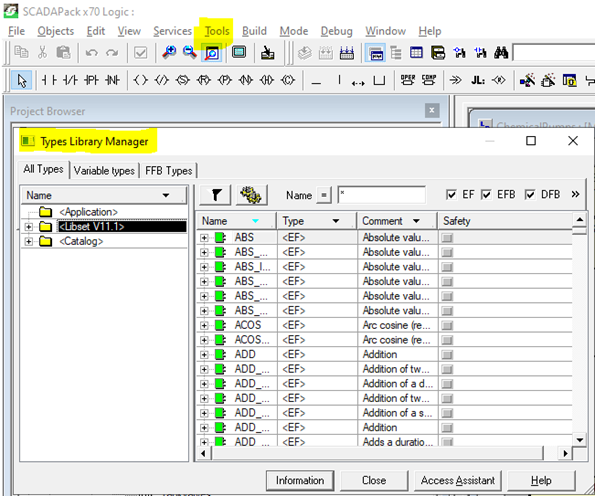
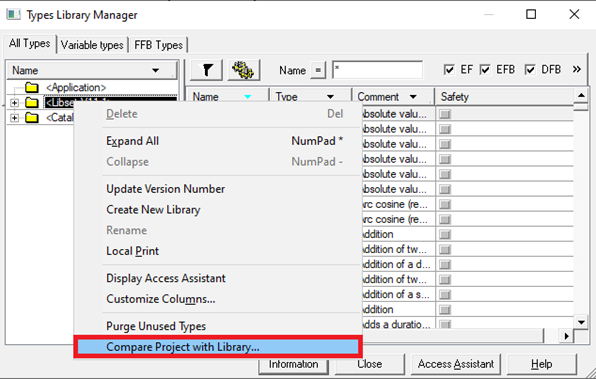
3. Right click on "LibSet" and then "Compare Project with Library ...!
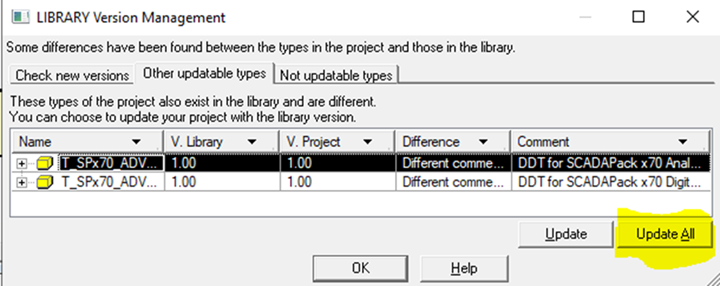
4. In "LIBRARY Version Management: select "Update All" and then follow the steps.
5. Update and build the project
6. Close and open the RemoteConnect project.
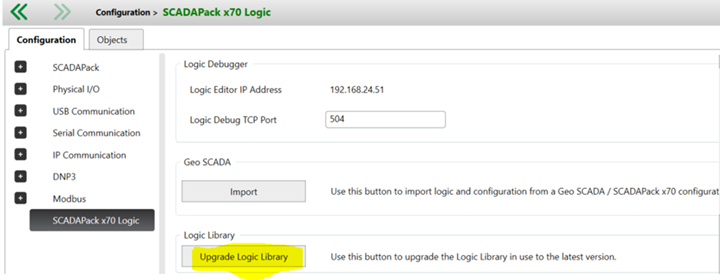
7. Click on Update Logic Library and then YES to proceed with upgrading LibSet V11.1 to V15.1
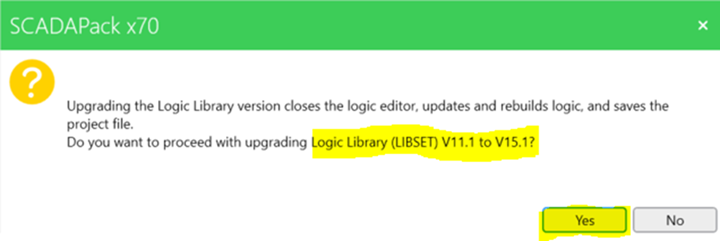
8. Verify that now when Types Library Manager LibSet is V15.1
Here are the steps for library update from RemoteConnect:
1. Open project in RemoteConnect and then open x70 Ladder Editor
2. Select "Tools" and then "" and observe <LibSet V11.1>
3. Right click on "LibSet" and then "Compare Project with Library ...!
4. In "LIBRARY Version Management: select "Update All" and then follow the steps.
5. Update and build the project
6. Close and open the RemoteConnect project.
7. Click on Update Logic Library and then YES to proceed with upgrading LibSet V11.1 to V15.1
8. Verify that now when Types Library Manager LibSet is V15.1
Publicado para: Schneider Electric Portugal
Explorar mais
Produto:
Explorar mais
Produto:
Precisa de ajuda?
Ferramenta de seleção de produtos
Encontre rápida e facilmente os produtos e acessórios certos para as suas aplicações.
Obter um Orçamento
Inicie o seu pedido de contacto online e um especialista irá contactá-lo.
Onde adquirir?
Encontre facilmente o distribuidor mais próximo da Schneider Electric perto de si.
Centro de ajuda
Encontre recursos de apoio para todas as suas necessidades, num único local.