


How to get switch link status by EIP
Summary:
QEIO used in customer site instead of S908 RIO, the management switch always be used in the topologic architecture, the customer application should be able to monitor the status of the switch link, especially the link between switches.
There are two simple ways to get the switch link status, both of them is by Ethernet IP communication.
Main ring ConneXium switch link status and RSTP role information are obtained using EtherNet/IP CIP objects. Switch port link status information is obtained using instance 2 of the I/O Data Object class (class ID 0x04). The link status information is obtained using the instance attribute called Instance Data (instance attribute 0x03). Each bit in this attribute word represents one of the switch’s eight Ethernet ports. A value of 0 indicates that the link is down. A value of 1 indicates that the link is up.
Switch port RSTP role and state information is obtained using instances 2-9 of the RSTP Port Object class (class ID 0x65). The example PAC program uses this information to derive subring redundancy status by monitoring which sub-ring port (5 or 6) is in blocking mode. Port RSTP role information is used to determine which main ring link is serving in the RSTP alternate role.
Here we give example for switch link status.
DTM to send EIP request and get responseFor QEIO, user can get the switch link status by its DTM, which is also valid for NOC.
“F9” means the connection status of the switch port. Detail refer to the switch user manual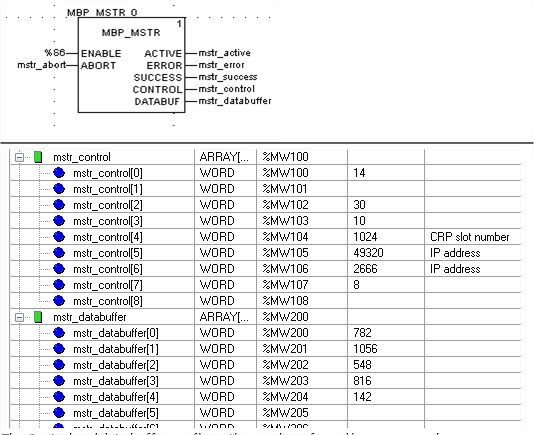
The Control and data buffer configuration can be referred in user manual
QEIO used in customer site instead of S908 RIO, the management switch always be used in the topologic architecture, the customer application should be able to monitor the status of the switch link, especially the link between switches.
There are two simple ways to get the switch link status, both of them is by Ethernet IP communication.
- DTM to send EIP request and get response
- MSTR EFB to send request and get response
Main ring ConneXium switch link status and RSTP role information are obtained using EtherNet/IP CIP objects. Switch port link status information is obtained using instance 2 of the I/O Data Object class (class ID 0x04). The link status information is obtained using the instance attribute called Instance Data (instance attribute 0x03). Each bit in this attribute word represents one of the switch’s eight Ethernet ports. A value of 0 indicates that the link is down. A value of 1 indicates that the link is up.
Switch port RSTP role and state information is obtained using instances 2-9 of the RSTP Port Object class (class ID 0x65). The example PAC program uses this information to derive subring redundancy status by monitoring which sub-ring port (5 or 6) is in blocking mode. Port RSTP role information is used to determine which main ring link is serving in the RSTP alternate role.
Here we give example for switch link status.
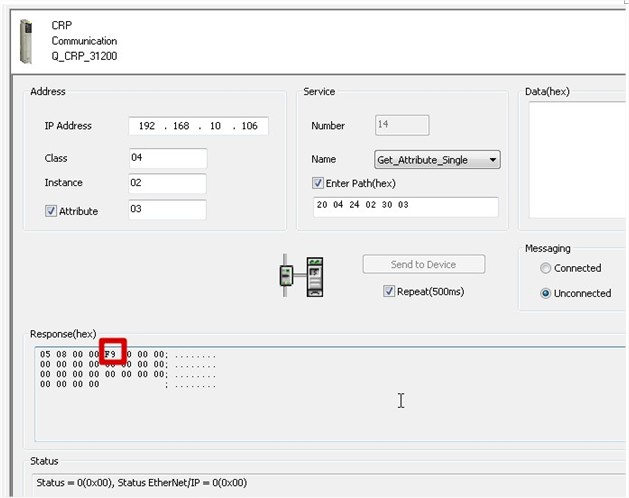
DTM to send EIP request and get responseFor QEIO, user can get the switch link status by its DTM, which is also valid for NOC.
“F9” means the connection status of the switch port. Detail refer to the switch user manual
- MSTR EFB to send request and get responseEIP class 0x04, instance 0x02, attribute 0x03
The Control and data buffer configuration can be referred in user manual
Released for: Schneider Electric Saudi Arabia
