.svg)
You can connect a PC to the LTM CU via the RJ45 on the front face of the unit, as shown in the diagram below.
The diagrams below show the connections from a PC to the LTM CU and the LTM R controller, with and without the LTME expansion module:
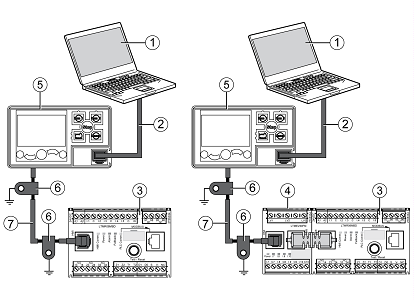
1 PC running SoMove with the TeSys T DTM
2 Cable kit TCSMCNAM3M002P
3 LTMR controller
4 LTME expansion module
5 LTMCU Control Operator Unit
6 Grounding collar
7 LTM9CU•• HMI device connection cable
Note:
When the LTMCU is connected to a PC, the LTMCU becomes passive and cannot be used to visualize information.
The diagrams below show the connections from a PC to the LTM CU and the LTM R controller, with and without the LTME expansion module:
1 PC running SoMove with the TeSys T DTM
2 Cable kit TCSMCNAM3M002P
3 LTMR controller
4 LTME expansion module
5 LTMCU Control Operator Unit
6 Grounding collar
7 LTM9CU•• HMI device connection cable
Note:
When the LTMCU is connected to a PC, the LTMCU becomes passive and cannot be used to visualize information.
Released for: Schneider Electric Saudi Arabia


