EcoStruxure™ IT SmartConnect

90%

experienced lost access to critical systems

experienced lost access to critical systems

83%

tolerate ≤3 hours of downtime

tolerate ≤3 hours of downtime

22 hrs

average downtime per incident

average downtime per incident

1 in 3

organisations face monthly incidents

organisations face monthly incidents

Make the most of your investment

Get notified about firmware updates, maintenance schedules, and warranty status - before issues arise.

Maximise uptime of your system

Spot high-incident or noisy locations early and make informed upgrades.

Asset registration and inventory management

Monitor device health, plan upgrades, and share reports with stakeholders - no manual tracking needed.

Command your UPS fleet from a single secure console

Command your UPS fleet from a single secure console

Monitor operational status, battery health and event history for every APC Smart-UPS in one place. Diagnose issues and act before downtime hits.

Secure, remote monitoring

Cloud-connectable APC Smart-UPS are monitored through a secure web application so you can stay up-to-date on the status of your power infrastructure.

  • Remote power monitoring

    Remote power monitoring

    View UPS operating and health status on the SmartConnect dashboard

  • Power availability

    Power availability

    Monitors on-site power availability with power outage restored notifications

  • Remote power-cycling

    Remote power-cycling

    Remote power-cycling of servers or routers in hard-to-reach locations

How it works

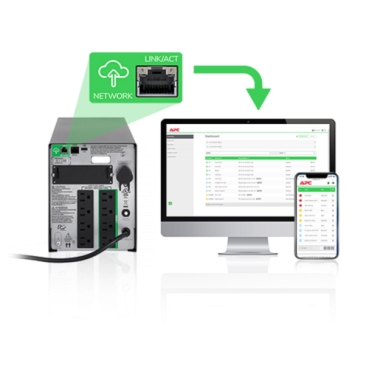
Easy cloud connectivity

A wide range of APC Smart-UPS are cloud enabled with a built-in SmartConnect Ethernet port. We've made it as easy and cost effective as possible to monitor your UPS online.

How it works

Simplified setup

Maximise the lifespan of your UPS, and protect your investment, with pro-active notifications for UPS firmware upgrade, device maintenance and warranty protection.

How it works

Efficient asset management

Locate and monitor assets on a map, improving visibility and helping you manage operations more efficiently.

How it works

Standard

Advanced

Action
Remote UPS monitoring
View UPS operating and health status
Included
Included
World Map or List view of devices
Included
Included
Custom device tags for grouping and search
Included
Included
Alerts and integrations
Built-in, pre-configured email notification
Included
Included
Slack and Teams integrations
Included
Included
Automated UPS firmware alerts
Included
Included
Event logs and uptime summary reports
Included
Included
Downloadable inventory reports
Included
Included

Choose your subscription

Choose your subscription
SmartConnect for Smart-UPS

SmartConnect for Smart-UPS

SmartConnect for Back-UPS

SmartConnect for Back-UPS

Plug In

Plug In

Connect your Smart-UPS via built-in Ethernet port

Scan QR

Scan QR

Use your phone to scan the QR code on device

Register your UPS

Register your UPS

Your UPS appears in the portal within minutes

How to setup APC Smart-UPS

Remote power monitoring with SmartConnect
EcoStruxure IT DCIM Software Solutions 1 page Brochure
EcoStruxure IT SmartConnect - Frequently Asked Questions
EcoStruxure IT SmartConnect Help Centre Remotely monitor the status of your APC Smart-UPS and get automatic notifications about UPS events and firmware updates.
SE Exchange Power and Cooling Forum Support community for our complete data centre and IT infrastructure offers, including our APC offers and EcoStruxure IT software and services.

Get the support and expertise behind SmartConnect

Access the EcoStruxure IT SmartConnect Help Centre for step-by-step guidance, or collaborate with Schneider Electric experts and peers in the SE Exchange community to solve complex power challenges faster.
  • Product Documentation
  • Software Downloads
  • Product Selector
  • Product Substitution and Replacement
  • Help and Contact Centre
  • Find our Offices
  • Get a Quote
  • Where to buy
  • Schneider Electric Community
  • Careers
  • Company Profile
  • Report a misconduct
  • Accessibility
  • Newsroom
  • Investors
  • EcoStruxure
  • Job Search
  • Blog
  • Privacy Policy
  • Cookie Notice
  • Terms of use
  • Change your cookie settings