


PME Dashboard Slide Show Refresh Interval for PME 9.0
Issue
A customer using PME 9.0 wants to reduce the dashboard refresh interval to a value lower than 10 seconds or the interval change is not saving when performed from the Setup web page.
Product Line
Power Monitoring Expert 7.x
Power Monitoring Expert 8.x
Power Monitoring Expert 9.0
Environment
Power Monitoring Expert - Web Applications Dashboards Slide Show
Cause
User Account Controls may be active for the system or the logged-on Windows user does not have the read and write permissions on the PME installation directory.
Resolution
*Warning: Take backups of any files prior to modifying them. Ensure the backups are in a location that will not be overwritten (i.e. the Desktop).
Deactivate User Account Controls for the system and ensure that the logged-on Windows user has read/write permissions to the installation directory.
This setting can be adjusted by making a manual edit to the "DefaultSlideshowIntervalInSeconds" setting parameter in the file:
<install drive>:\Program Files (x86)\Schneider Electric\Power Monitoring Expert\Applications\ApplicationFramework\Framework.xml" (This is the default install path which can vary)
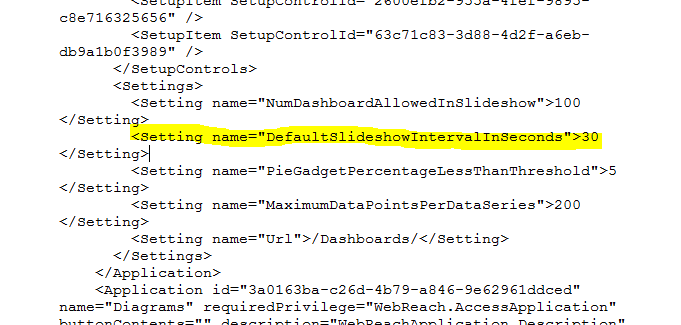
Restart the Application Module services and perform an iisreset from a command prompt to allow the change to take effect.
Note* This fix only works for the PME 9.0 version and older.
A customer using PME 9.0 wants to reduce the dashboard refresh interval to a value lower than 10 seconds or the interval change is not saving when performed from the Setup web page.
Product Line
Power Monitoring Expert 7.x
Power Monitoring Expert 8.x
Power Monitoring Expert 9.0
Environment
Power Monitoring Expert - Web Applications Dashboards Slide Show
Cause
User Account Controls may be active for the system or the logged-on Windows user does not have the read and write permissions on the PME installation directory.
Resolution
*Warning: Take backups of any files prior to modifying them. Ensure the backups are in a location that will not be overwritten (i.e. the Desktop).
Deactivate User Account Controls for the system and ensure that the logged-on Windows user has read/write permissions to the installation directory.
This setting can be adjusted by making a manual edit to the "DefaultSlideshowIntervalInSeconds" setting parameter in the file:
<install drive>:\Program Files (x86)\Schneider Electric\Power Monitoring Expert\Applications\ApplicationFramework\Framework.xml" (This is the default install path which can vary)
Restart the Application Module services and perform an iisreset from a command prompt to allow the change to take effect.
Note* This fix only works for the PME 9.0 version and older.