


How to solve the Unity Pro V11.1 installation problem when the "Unity Pro Ethernet Configuration Tool" CDROM source request occurs.
Trying to install Unity 11.1, if the "Ethernet Configuration Tool" CDROM tool is requested:
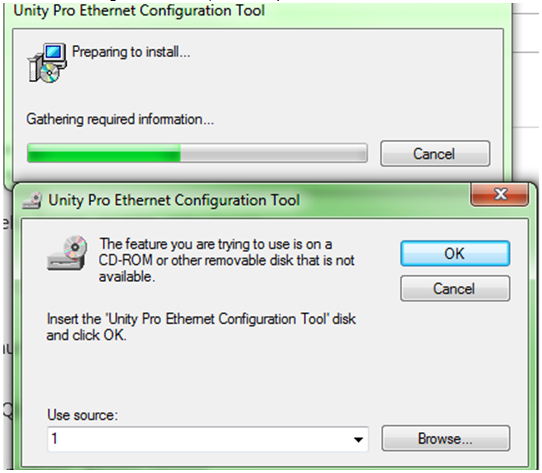
That means the installation process does find the original installation ressource about Unity pro ethernet configuration tool.
Two ways are possible to solve this problem:
- Try to manually uninstall (via the control panel, add/remove program) the "Unity Pro Ethernet configuration tool" and "Unity Pro PlantStructure DTM Library".
If the problem is the same,
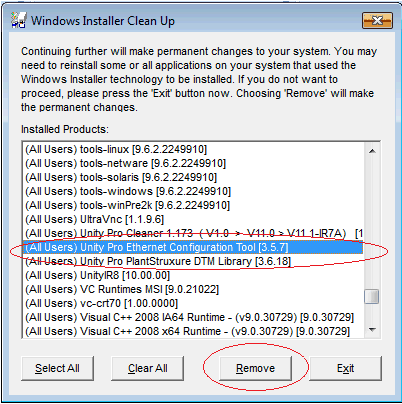
- Use the free tool msicuu2.exe (attached) to force the "Unity Pro Ethernet configuration tool" and "Unity Pro PlantStructure DTM Library" uninstallation:
That means the installation process does find the original installation ressource about Unity pro ethernet configuration tool.
Two ways are possible to solve this problem:
- Try to manually uninstall (via the control panel, add/remove program) the "Unity Pro Ethernet configuration tool" and "Unity Pro PlantStructure DTM Library".
If the problem is the same,
- Use the free tool msicuu2.exe (attached) to force the "Unity Pro Ethernet configuration tool" and "Unity Pro PlantStructure DTM Library" uninstallation: