


Unable to open the AP9613 - dry contact I/O card configuration utility in Windows 10
Issue
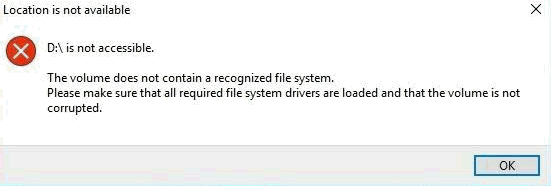
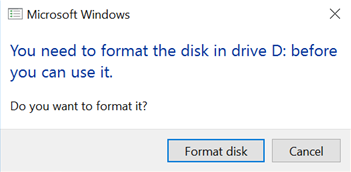
Users are unable to open the AP9613 dry contact I/O card configuration utility in Windows 10. When connecting the card to the PC/laptop for the first time the following error messages are displayed when attempting to open the card's removable drive in Windows File Explorer:
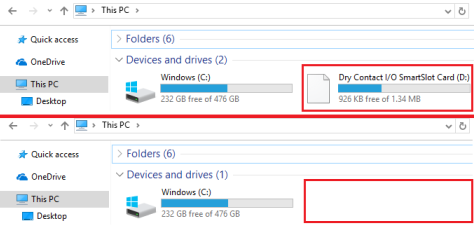
On subsequent connections to the same PC/laptop these error messages are not displayed; the card's removable drive is also not displayed.
Product Line
AP9613 - Dry Contact I/O SmartSlot Card.
Environment
Cause
Users are unable to open the dry contact I/O card configuration utility when the AP9613 is connected with the supplied USB cable to a PC/laptop running Windows 10 (version 10.0.14393, build 14393). Testing performed on this issue shows that PC/laptops running OS versions prior to and after the 10.0.14393 version (build 14393) do not exhibit this issue.
Resolution
Update the operating system to the latest stable version.
Users are unable to open the AP9613 dry contact I/O card configuration utility in Windows 10. When connecting the card to the PC/laptop for the first time the following error messages are displayed when attempting to open the card's removable drive in Windows File Explorer:
On subsequent connections to the same PC/laptop these error messages are not displayed; the card's removable drive is also not displayed.
Product Line
AP9613 - Dry Contact I/O SmartSlot Card.
Environment
- AP9613 - all serial numbers. Firmware revision 210.
- Operating System: Microsoft Windows 10, version 10.0.14393, build 14393.
Cause
Users are unable to open the dry contact I/O card configuration utility when the AP9613 is connected with the supplied USB cable to a PC/laptop running Windows 10 (version 10.0.14393, build 14393). Testing performed on this issue shows that PC/laptops running OS versions prior to and after the 10.0.14393 version (build 14393) do not exhibit this issue.
Resolution
Update the operating system to the latest stable version.