


Unable to find PSE/PME alarms when configuring ENM filters
Issue
ENM filters do not show any alarms that were set in PME or PSE
Product Line
Power Monitoring Expert 8.x, ENM 8.3.x
PowerSCADA Expert 8.x, ENM 8.3.x
Environment
ENM Configuration
Cause
A customer may see only partial or no alarms in the ENM filter respective to their event source. It has been verified that the alarms are configured and working properly in PME/PSE and the correct event source has been selected in ENM. At this point, it may be useful to see if PME/PSE is publishing the alarm data properly for ENM to see. The below links will aid in troubleshooting steps to verify that the alarm proxy is functioning as intended.
Resolution
Note: Use the links below on the server to verify that the alarm proxy is functional.
Status URL: shows if the AlarmServiceHost is functional and if an ENM license is active as well as the populated alarms.
Source List URL: where ENM grabs the Source information.
Event URL: will show a particular event id information. Replace with the Event ID from the ION_Data database.
Power Monitoring Expert (PME)
Service Name: ApplicationModules AlarmServiceHost
Status URL: http://IP:23102/AlarmServiceHost/Alarms/AlarmProxy/status
Source List URL: http://IP:23102/AlarmServiceHost/Alarms/AlarmProxy/GetAlarmDefinitions
Event URL: http://IP:23102/AlarmServiceHost/Alarms/AlarmProxy/GetAlarms/
Note: In PME 8.1 additional source URLs for individual tags are available for Alarm Configurations.
PowerSCADA Expert (PSE)
Service Name: Schneider Electric CoreServiceHost
Status URL: http://IP:23103/CoreServiceHost/Alarms/AlarmProxy/status
Source List URL: http://IP:23103/CoreServiceHost/Alarms/AlarmProxy/GetAlarmDefinitions
Note: In both instances, replace with the IP address of the server (If you are browsing the links from the PME/PSE server, you can use localhost). Open a command prompt. Type ipconfig to obtain the IP address on the server.
If the Alarm proxy works you should see something similar to the screen below.
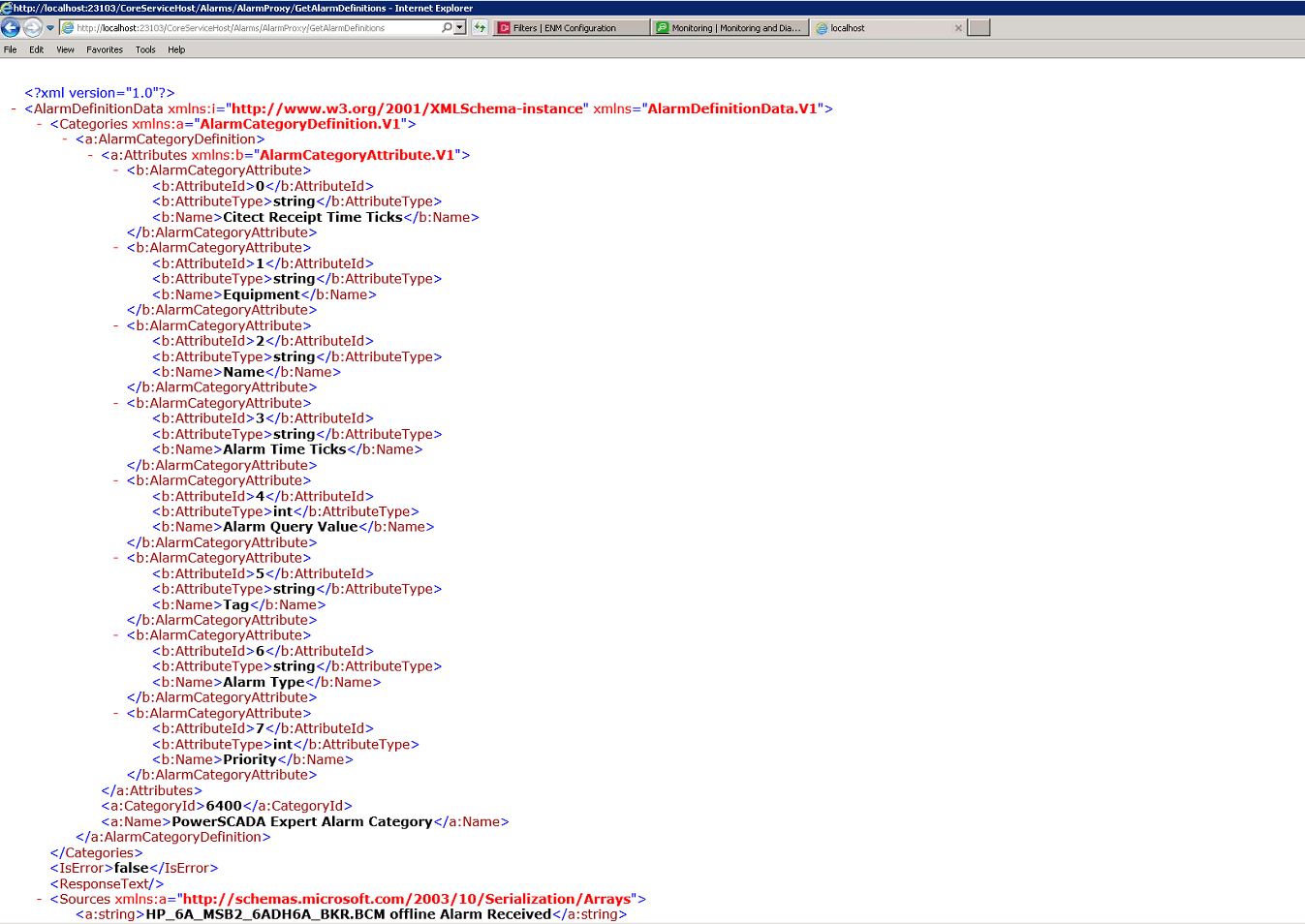
Noticed where the <IsError> entry displays false. If true is displayed an error message will be listed immediately which will provide further details of the error.
If the Alarm proxy shows an error, first try restarting the Schneider Electric CoreServiceHost to see if the issue is corrected.
ENM filters do not show any alarms that were set in PME or PSE
Product Line
Power Monitoring Expert 8.x, ENM 8.3.x
PowerSCADA Expert 8.x, ENM 8.3.x
Environment
ENM Configuration
Cause
A customer may see only partial or no alarms in the ENM filter respective to their event source. It has been verified that the alarms are configured and working properly in PME/PSE and the correct event source has been selected in ENM. At this point, it may be useful to see if PME/PSE is publishing the alarm data properly for ENM to see. The below links will aid in troubleshooting steps to verify that the alarm proxy is functioning as intended.
Resolution
Note: Use the links below on the server to verify that the alarm proxy is functional.
Status URL: shows if the AlarmServiceHost is functional and if an ENM license is active as well as the populated alarms.
Source List URL: where ENM grabs the Source information.
Event URL: will show a particular event id information. Replace with the Event ID from the ION_Data database.
Power Monitoring Expert (PME)
Service Name: ApplicationModules AlarmServiceHost
Status URL: http://IP:23102/AlarmServiceHost/Alarms/AlarmProxy/status
Source List URL: http://IP:23102/AlarmServiceHost/Alarms/AlarmProxy/GetAlarmDefinitions
Event URL: http://IP:23102/AlarmServiceHost/Alarms/AlarmProxy/GetAlarms/
Note: In PME 8.1 additional source URLs for individual tags are available for Alarm Configurations.
PowerSCADA Expert (PSE)
Service Name: Schneider Electric CoreServiceHost
Status URL: http://IP:23103/CoreServiceHost/Alarms/AlarmProxy/status
Source List URL: http://IP:23103/CoreServiceHost/Alarms/AlarmProxy/GetAlarmDefinitions
Note: In both instances, replace with the IP address of the server (If you are browsing the links from the PME/PSE server, you can use localhost). Open a command prompt. Type ipconfig to obtain the IP address on the server.
If the Alarm proxy works you should see something similar to the screen below.
Noticed where the <IsError> entry displays false. If true is displayed an error message will be listed immediately which will provide further details of the error.
If the Alarm proxy shows an error, first try restarting the Schneider Electric CoreServiceHost to see if the issue is corrected.