


PME9 CU2 EN50160v2010 Report for ION9000 shows double Observation with the same timestamp.
Issue:
PME9 CU2 EN50160v2010 Report for ION9000 shows double Observation with the same timestamp.
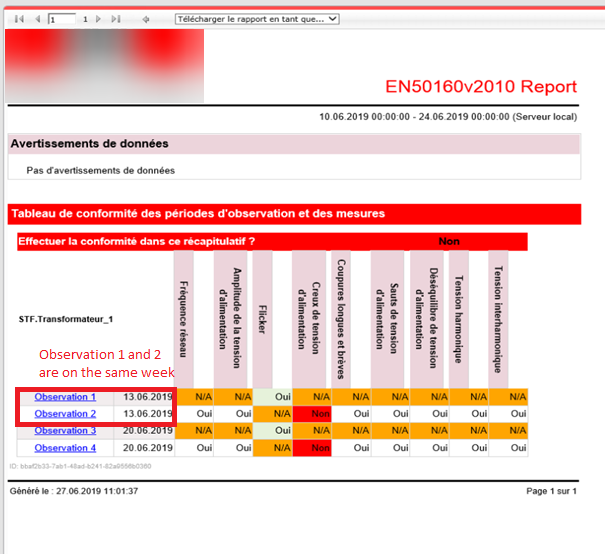
Explanation:
In summary, the timestamp is the problem. The team was checking all the EN50160 stored procedures and found that for the ION9000 test is that some of the EN50160 measurements are getting recorded in a different timestamp than the rest of them.
For Example, Flickr was one of the measurements that were getting timestamp that was slightly different than the rest.
How to Check:
First thing is to have them run some SQL checks to see if they are seeing the same issue, we do on the test machine where the Timestamps are slightly different causing the duplicate Observation entry.
I've attached a SQL Query that they can modify to use. Just change the date range and the sourceID of the source they would like to check.
- Go to Vista and open the meter template -> Power Quality -> EN50160 Button -> EN50160 Control Tab ->
- Look at PQ Sync Mode and make sure this is turned on so that synchronizes together. (Should be on by default)
- Look at PQ Sync Today/Sat. This controls what day you want it to use to sync the weekly data.
- You can also check this through designer if you wanted,
Designer to Meter -> Advanced Setup Frameworks -> Power Quality -> EN50160 Power Quality Standard -> PQ Support -> PQ Reset and Synchronization
Resolution to correct future observation periods:
The Firmware Devs looked into the issue. One thing we would like the customer to try is to make sure the meters are set to Synchronization Mode: Scheduled.
1) Connect to the meter using Vista-> Power Quality Tab -> EN50160 Button -> EN50160 Control Tab.
Set Synchronization Mode to Scheduled.
2) Log into Designer and go to the meter. Find and Set all EN50160 weekly and 10min data recorder setup registers to "round to nearest minute".
Comments about historical data already in the database
We can update the flicker data that was out of sync to have the same timestamp as the others and then they will only get a single observation per week.
If you need to correct the historical data already in the database, please contact technical support. Please attach the output of the query