


Data Center Expert | Devices Stuck in Maintenance Mode After Upgrade to 7.8.1
Issue:
After upgrading to Data Center Expert version 7.8.1, devices are stuck in maintenance mode.
Product line:
StruxureWare Data Center Expert (DCE)
- Basic Appliance (AP9465)
- Standard Appliance (AP9470)
- Enterprise Appliance (AP9475)
- Virtual Appliance (AP94VMACT)
Environment:
StruxureWare Data Center Expert (7.8.1)
Resolution:
In order to remove the device from maintenance mode, the device must first be entered into maintenance mode again.
1) Within the DCE Desktop Client, navigate to the Monitoring perspective:

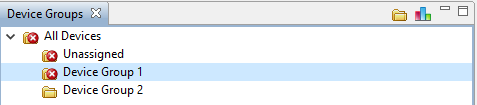
2) Click on All Devices or the specific device group within the Device Groups pane that contains the device stuck in maintenance mode:
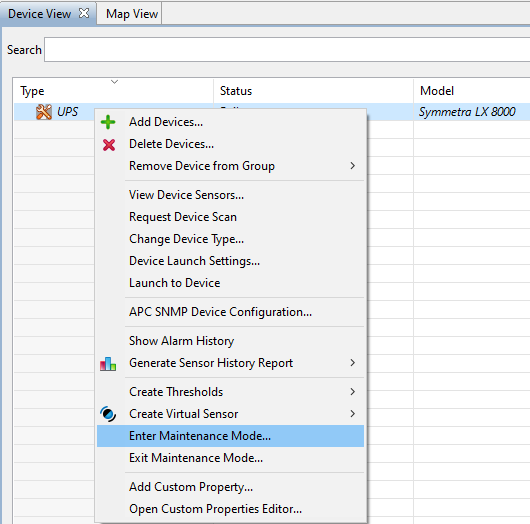
3) Within the Device View pane, right-click on the device stuck in maintenance mode and select Enter Maintenance Mode:
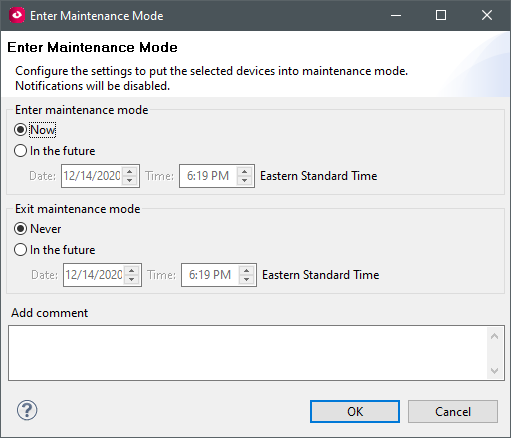
4) Leave the default value of Now for Enter maintenance mode and Never for Exit maintenance mode and click OK:
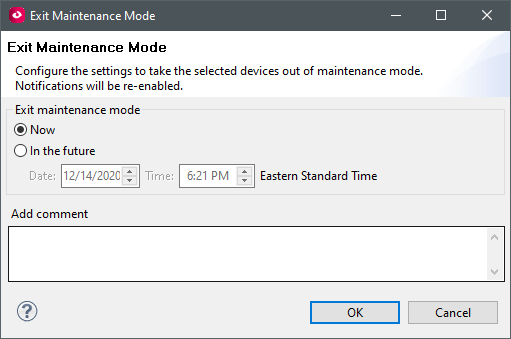
5) Right-click on the device stuck in maintenance mode and select Exit Maintenance Mode:

6) Click OK to Exit Maintenance Mode for the device.
The device should now have exited maintenance mode. If it did not, please reach out to your local technical support for assistance.
After upgrading to Data Center Expert version 7.8.1, devices are stuck in maintenance mode.
Product line:
StruxureWare Data Center Expert (DCE)
- Basic Appliance (AP9465)
- Standard Appliance (AP9470)
- Enterprise Appliance (AP9475)
- Virtual Appliance (AP94VMACT)
Environment:
StruxureWare Data Center Expert (7.8.1)
Resolution:
In order to remove the device from maintenance mode, the device must first be entered into maintenance mode again.
1) Within the DCE Desktop Client, navigate to the Monitoring perspective:
2) Click on All Devices or the specific device group within the Device Groups pane that contains the device stuck in maintenance mode:
3) Within the Device View pane, right-click on the device stuck in maintenance mode and select Enter Maintenance Mode:
4) Leave the default value of Now for Enter maintenance mode and Never for Exit maintenance mode and click OK:
5) Right-click on the device stuck in maintenance mode and select Exit Maintenance Mode:
6) Click OK to Exit Maintenance Mode for the device.
The device should now have exited maintenance mode. If it did not, please reach out to your local technical support for assistance.