


How to read the AXISDIAGID value of Motion Function Block MC_READAXISERROR?
Issue:
If an error or warning occurs on a servodrive, the MFB “Motion Function Block” specifies an error code by applying a value in the AXISDIAGID output type “UINT”.
Product Line:
M580 CPUs
Environment:
BMECXM0100 CANopen
Resolution:
The MC_READPARAMETER motion function block is used to read, via Service Data Object (SDO) messaging, a variable in the servodrive defined by the AXIS parameter.
The following table shows the list of diagnostic objects and the corresponding values according to the drive types:

Example to read AXIDIAGID value from Lexium32 servodrive using the MFB MC_READPARAMETER:
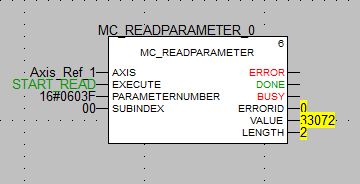
When the problem occurs, you must activate the block function. The input PIN “EXECUTE” type BOOL must be activated.
Respect the 3 parameters:
1. AXIS: Variable declared for axis
2. PARMATERNUMBER: CANopen index number of your servodrive (603F:0) = 0603F
3. SUBINBDEX: CANopen subindex number of your servodrive (603F:0) = 00
In this case the result value is 33072 (decimal) converted in hexadecimal is 8130
After that you can make a research to know what this error corresponds to depending on the type of drive selected.
Here we have a lexium32 with an error 8130, with these two elements we can look for what the error corresponds to in the manufacturer catalog or on the web.
For this example, an FAQ has been created with this error code and type of servo drive precisely.
https://www.se.com/ww/en/faqs/FA330962/
If an error or warning occurs on a servodrive, the MFB “Motion Function Block” specifies an error code by applying a value in the AXISDIAGID output type “UINT”.
Product Line:
M580 CPUs
Environment:
BMECXM0100 CANopen
Resolution:
The MC_READPARAMETER motion function block is used to read, via Service Data Object (SDO) messaging, a variable in the servodrive defined by the AXIS parameter.
The following table shows the list of diagnostic objects and the corresponding values according to the drive types:
Example to read AXIDIAGID value from Lexium32 servodrive using the MFB MC_READPARAMETER:
When the problem occurs, you must activate the block function. The input PIN “EXECUTE” type BOOL must be activated.
Respect the 3 parameters:
1. AXIS: Variable declared for axis
2. PARMATERNUMBER: CANopen index number of your servodrive (603F:0) = 0603F
3. SUBINBDEX: CANopen subindex number of your servodrive (603F:0) = 00
In this case the result value is 33072 (decimal) converted in hexadecimal is 8130
After that you can make a research to know what this error corresponds to depending on the type of drive selected.
Here we have a lexium32 with an error 8130, with these two elements we can look for what the error corresponds to in the manufacturer catalog or on the web.
For this example, an FAQ has been created with this error code and type of servo drive precisely.
https://www.se.com/ww/en/faqs/FA330962/